
Kellogg Salesforce Interview Questions
Table Of Contents
- Salesforce Fundamentals
- Salesforce Implementation & Customization
- Salesforce Automation & Process Optimization
- Salesforce Integration & Data Management
- Salesforce Marketing & Analytics
Kellogg’s, established in 1906 by W.K. Kellogg, revolutionized breakfast with the introduction of corn flakes, laying the foundation for the modern cereal industry. Expanding globally, Kellogg’s entered the Indian market in 1994, adapting its products to local tastes and preferences. Today, the company operates in over 180 countries, offering a diverse range of cereals and snacks. Kellogg’s commitment to nutrition and innovation has solidified its position as a leader in the global food industry.
“Kellogg Company has leveraged Salesforce’s Philanthropy Cloud to enhance its corporate social responsibility initiatives”. By implementing this platform, Kellogg empowers its employees to engage in volunteerism and charitable giving, aligning with the company’s commitment to addressing food security and creating ‘Better Days’ for communities worldwide.
The Philanthropy Cloud provides Kellogg employees with personalized dashboards to track donations and volunteer hours, access company campaigns, and discover local initiatives matching their interests. This integration fosters a culture of ‘citizen philanthropists’ within the organization, enabling staff to contribute meaningfully to societal issues.
By adopting Salesforce’s platform, Kellogg not only streamlines its philanthropic efforts but also strengthens employee engagement, reflecting a modern approach to corporate citizenship.
Join our FREE demo session at CRS Info Solutions and kickstart your Salesforce journey with our comprehensive Salesforce Online Training covering Admin, Developer, and LWC. Build practical skills, prepare for certifications, and get interview-ready to accelerate your career growth!
Kellogg Salesforce Interview Questions
Salesforce Fundamentals
1. What are the key benefits of using Salesforce for a company like Kellogg?
Salesforce offers scalability, automation, and data-driven insights, making it an ideal choice for a global enterprise like Kellogg. With Salesforce, I can centralize customer interactions, automate workflows, and improve collaboration across departments. This helps Kellogg deliver personalized customer experiences, enhance sales performance, and streamline operations. Since Kellogg operates in multiple markets, Salesforce’s cloud-based platform ensures seamless integration across global teams, reducing manual processes and improving efficiency.
Another key benefit is real-time analytics and reporting, which provide valuable insights into customer preferences and market trends. With AI-powered tools like Salesforce Einstein, I can leverage predictive analytics to forecast demand and optimize sales strategies. Additionally, Salesforce ensures data security and compliance, helping Kellogg meet industry regulations while maintaining customer trust. By integrating with other enterprise applications, I can create a unified ecosystem that enhances decision-making and drives business growth.
2. How does Salesforce improve CRM efficiency for large enterprises?
Salesforce enhances Customer Relationship Management (CRM) by providing a 360-degree view of customers, enabling Kellogg to track interactions, preferences, and purchase history. With all customer data in one place, I can improve customer engagement, resolve issues faster, and drive loyalty. The AI-powered automation tools in Salesforce reduce repetitive tasks, allowing teams to focus on high-value activities like strategic planning and customer retention.
Additionally, Salesforce supports multi-channel communication, enabling seamless engagement across email, phone, social media, and web portals. This ensures that customer interactions remain consistent and personalized. Advanced workflow automation and AI-driven insights allow Kellogg to predict customer behavior and deliver proactive solutions, improving overall CRM efficiency. By leveraging these tools, I can enhance productivity, reduce response times, and maximize customer satisfaction.
3. What are the main differences between Sales Cloud, Service Cloud, and Marketing Cloud?
Sales Cloud is designed for sales teams to manage leads, opportunities, and customer accounts. It includes tools for pipeline tracking, sales forecasting, and automation, helping Kellogg’s sales teams close deals faster. With features like Lead Scoring and AI-based recommendations, I can prioritize high-value leads and improve conversion rates. Custom dashboards and reports provide insights into sales performance, ensuring teams stay on track to meet their targets.
Service Cloud, on the other hand, focuses on customer support and case management. It includes features like chatbots, self-service portals, and AI-driven case routing, allowing Kellogg to provide quick and effective customer support. With Omni-Channel Routing, I can ensure customer queries reach the right support agent, reducing wait times and improving service quality. The Knowledge Base feature empowers customers to find solutions independently, enhancing the overall service experience.
Marketing Cloud is built for customer engagement and campaign management. It allows Kellogg to create personalized marketing campaigns, track customer interactions, and analyze engagement metrics. Features like Journey Builder, Email Studio, and AI-driven segmentation help me target the right audience with relevant content. This cloud ensures that marketing efforts align with customer needs, increasing brand loyalty and sales.
4. Can you explain the role of Salesforce in digital transformation?
Salesforce plays a crucial role in digital transformation by enabling businesses like Kellogg to automate processes, integrate systems, and enhance customer experiences. By moving to a cloud-based CRM, I can eliminate traditional manual workflows and legacy systems, leading to faster decision-making and greater agility. With AI-driven insights and predictive analytics, I can anticipate market trends and customer behavior, helping Kellogg stay ahead of competitors.
A key aspect of digital transformation is seamless integration with other enterprise applications. Salesforce provides APIs and connectors that allow me to integrate it with ERP, e-commerce, and supply chain management systems.
For example, I can connect Salesforce with SAP ERP to synchronize inventory levels with customer demand. If a store in New York runs out of a popular cereal, Salesforce can trigger an automated request to SAP, ensuring restocking happens quickly.
Additionally, the low-code and no-code development capabilities of Salesforce allow teams to build custom applications without extensive programming knowledge.
Here’s a small example of an Apex trigger that automatically updates order status in Salesforce when a shipment is dispatched:
trigger UpdateOrderStatus on Shipment__c (after insert) {
    for (Shipment__c s : Trigger.new) {
        Order__c order = [SELECT Id, Status__c FROM Order__c WHERE Id = :s.Order__c];
        order.Status__c = 'Shipped';
        update order;
    }
}
Code Explanation: This Apex trigger runs after a new Shipment__c record is inserted. It retrieves the related Order__c record and updates its Status__c field to ‘Shipped’. This ensures that as soon as a shipment is recorded, the corresponding order status gets updated automatically, improving real-time tracking of orders.
5. How does Salesforce help in managing customer data security and compliance?
Salesforce provides enterprise-grade security features that help Kellogg protect customer data and comply with industry regulations. With features like role-based access control (RBAC), encryption, and multi-factor authentication, I can ensure that only authorized users access sensitive information.
Salesforce also supports field-level security, allowing me to restrict access to specific data fields based on user roles. This helps maintain data privacy and confidentiality across different teams.
For instance, a sales representative should only see customer contact details and purchase history, while an accounting team should have access to billing details. With RBAC, I can configure different access levels, ensuring each user sees only the necessary information.
Salesforce’s Shield Platform Encryption enhances data security by encrypting data at rest and in transit. This ensures that even if data is intercepted, it remains unreadable to unauthorized parties. The audit trail and event monitoring capabilities provide a detailed record of data access and modifications, helping Kellogg maintain compliance with regulations like GDPR, CCPA, and HIPAA.
Additionally, Salesforce offers data backup and disaster recovery solutions, ensuring business continuity in case of system failures. By implementing real-time monitoring and anomaly detection, I can identify potential security threats before they cause harm.
Here’s an example of a simple validation rule that prevents users from saving a record unless a data security checkbox is selected:
IF(NOT(ISPICKVAL(Data_Security_Agreement__c, "Accepted")), true, false)Code Explanation: This validation rule ensures that users cannot save a record unless the Data_Security_Agreement__c field is set to ‘Accepted’. This helps enforce compliance by making sure all users acknowledge security policies before proceeding with sensitive operations.
Salesforce Implementation & Customization
6. What are the key challenges in implementing Salesforce at Kellogg?
Implementing Salesforce at Kellogg comes with challenges such as data migration, user adoption, and system integration. Since Kellogg operates on a global scale, migrating existing customer data, sales records, and supply chain information into Salesforce requires careful planning to prevent data loss or duplication. Ensuring data integrity is critical, as inconsistencies can lead to inaccurate reporting and decision-making. Additionally, integrating Salesforce with ERP systems like SAP and other legacy tools requires API-based connections, which may involve complex customization.
Another challenge is user adoption, as employees may resist transitioning from traditional CRM systems to Salesforce. To overcome this, I focus on user training, role-based customization, and automation to simplify workflows. For example, using Salesforce Flow, I can create guided processes for sales and customer service teams, making it easier for them to complete tasks. Additionally, leveraging AI-driven insights from Salesforce Einstein helps users quickly identify trends and make data-driven decisions, improving efficiency and adoption rates.
7. How do you customize Salesforce to fit the needs of a global enterprise?
For a global enterprise like Kellogg, Salesforce customization is crucial for aligning the platform with regional business processes, multi-language support, and compliance requirements. I can customize Salesforce by configuring custom objects, fields, and workflows to meet specific business needs. Additionally, using record types and page layouts, I can ensure that different departments see only the relevant fields, improving usability.
Another essential customization is automation. By implementing Process Builder and Flow, I can automate repetitive tasks like lead assignment, approval processes, and email notifications. For example, if a sales rep in Europe creates a new lead, Salesforce can automatically assign it to the appropriate regional sales team based on location. Additionally, for global reporting, I configure multi-currency support and localization settings, ensuring seamless transactions across different regions.
8. What is the significance of Salesforce Lightning Experience for user adoption?
Salesforce Lightning Experience is designed to enhance user adoption by offering an intuitive interface, improved performance, and advanced customization options. Compared to Classic UI, Lightning provides a modern and responsive design that makes navigation smoother. Features like Kanban boards, interactive dashboards, and AI-driven insights help users complete tasks more efficiently.
For example, with Lightning App Builder, I can create customized home pages for different user roles, ensuring that sales reps, customer service agents, and managers see only the relevant information. Additionally, Lightning Components allow me to design drag-and-drop UI elements tailored to Kellogg’s business processes. This not only simplifies workflows but also reduces the need for complex coding, making it easier for administrators to adapt Salesforce to changing business needs.
Here’s a simple Lightning Component code snippet to display a list of accounts in a user-friendly format:
<aura:component controller="AccountController">
    <aura:attribute name="accounts" type="Account[]"/>
    <aura:handler name="init" value="{!this}" action="{!c.fetchAccounts}"/>
    <ul>
        <aura:iteration items="{!v.accounts}" var="acc">
            <li>{!acc.Name} - {!acc.Industry}</li>
        </aura:iteration>
    </ul>
</aura:component>
Code Explanation: This Lightning Component retrieves account data using an Apex controller and dynamically displays it in a list. This improves UI efficiency, allowing users to view accounts in a structured and visually appealing format, enhancing adoption.
9. How do you use record types and page layouts effectively in Salesforce?
Record types and page layouts are essential for ensuring that different users and departments see only relevant information in Salesforce. With record types, I can categorize data into multiple formats while maintaining a unified structure. For example, at Kellogg, I can create separate record types for B2B and B2C customers, ensuring that sales teams handle wholesale distributors and individual consumers differently.
Page layouts further enhance this by customizing the fields, buttons, and sections displayed based on user roles. For instance, a sales rep might need quick access to lead source and deal stage, while a customer support agent requires fields like case priority and resolution status. By assigning appropriate page layouts to profiles, I ensure a streamlined workflow for each department, improving efficiency. Additionally, using dynamic forms, I can display or hide fields based on user input, making the interface cleaner and more intuitive.
10. What are the best practices for optimizing Salesforce reports and dashboards?
To optimize Salesforce reports and dashboards, I follow best practices like data segmentation, report filters, and real-time analytics. First, I ensure that reports use efficient filters and groupings to present only relevant data. Instead of loading thousands of records, I create custom report types to pull data from specific objects, improving performance.
Another best practice is leveraging dynamic dashboards, which allow different users to see personalized insights based on their roles. For example, a regional sales manager can view monthly revenue trends for their specific region, while the global VP of Sales can see an aggregated performance summary. Additionally, by integrating Einstein Analytics, I can generate AI-powered predictions, helping Kellogg identify emerging market trends.
Here’s an Apex code snippet that automates report generation and sends it via email:
Messaging.SingleEmailMessage mail = new Messaging.SingleEmailMessage();
mail.setToAddresses(new String[]{'manager@kellogg.com'});
mail.setSubject('Weekly Sales Report');
mail.setPlainTextBody('Please find the attached sales report for this week.');
mail.setFileAttachments(new Messaging.EmailFileAttachment[]{reportAttachment});
Messaging.sendEmail(new Messaging.SingleEmailMessage[]{mail});
Code Explanation: This Apex code automates the process of sending weekly sales reports via email. It creates an email message, attaches a sales report, and sends it to the sales manager. This ensures timely data delivery, improving decision-making.
Salesforce Automation & Process Optimization
11. How does Kellogg use Salesforce automation to streamline business processes?
At Kellogg, we use Salesforce automation to optimize business processes, reduce manual efforts, and improve efficiency across sales, marketing, and customer service. By leveraging Flow Builder, Process Builder, and Apex triggers, we automate critical workflows such as lead assignment, order processing, and inventory management. For example, when a new lead enters the system, Salesforce automatically assigns it to the appropriate sales rep based on geography and lead score, ensuring faster follow-ups.
Additionally, marketing automation plays a key role in personalized customer engagement. By integrating Salesforce Marketing Cloud, we create automated email campaigns that nurture leads and send follow-ups based on customer behavior. In customer service, case automation routes tickets to the right agents based on priority and expertise, ensuring faster resolution times. These automation strategies significantly enhance operational efficiency and drive business growth.
12. Can you explain the role of Flow Builder in Salesforce automation?
Flow Builder is a powerful low-code automation tool that allows me to design complex business workflows without extensive coding. Unlike traditional Workflow Rules, Flow Builder enables me to create multi-step processes with conditional logic, data updates, and user interactions.
For example, I can build a lead qualification process using Flow Builder. When a new lead is created, the flow checks if the lead score is above 80. If yes, the lead is automatically converted into an opportunity and assigned to a sales rep. If no, it is sent to a nurturing campaign for further engagement.
Here’s a simple Flow Builder scenario to automate case escalation based on priority:
if (case.Priority == 'High' && case.Status == 'New') {
    case.OwnerId = Support_Manager;
    case.Status = 'Escalated';
    update case;
}
Code Explanation: This Apex snippet checks the priority of a case. If it is High, the system escalates it to a support manager. This automation helps reduce response time and improves customer satisfaction.
13. What is the difference between Workflow Rules and Process Builder?
Workflow Rules and Process Builder are both automation tools in Salesforce, but they differ in functionality and complexity. Workflow Rules are simpler and limited to IF-THEN conditions, which allow me to update fields, send emails, or create tasks. However, they cannot create new records or perform multi-step actions.
On the other hand, Process Builder provides a visual, point-and-click interface that supports complex workflows with multiple criteria. Unlike Workflow Rules, Process Builder can:
1. Create new records automatically (e.g., creating a follow-up task for a sales rep).
2. Trigger multiple actions within a single process (e.g., updating records, sending emails, and posting to Chatter).
3. Evaluate multiple conditions in a sequence, making automation more efficient.
For instance, if a customer’s subscription expires, Process Builder can:
- Send an email reminder.
- Create a renewal opportunity.
- Notify the account manager.
This makes Process Builder more powerful and flexible than Workflow Rules.
14. How do you ensure data integrity and consistency in Salesforce?
Maintaining data integrity in Salesforce is crucial to avoid duplicates, inaccuracies, and incomplete records. To achieve this, I implement:
1. Validation Rules: Prevents users from entering incorrect or incomplete data. For example, a rule can ensure that phone numbers follow a standard format.
2. Duplicate Rules and Matching Rules: Helps identify and merge duplicate records, ensuring clean and unique data.
3. Picklists and Lookup Fields: Reduces errors by restricting data input to predefined values or linked records.
4. Automation for Data Standardization: Using Flow Builder or Apex Triggers, I can auto-correct formats (e.g., converting “USA” to “United States”).
Here’s an Apex trigger example that ensures all account names are stored in uppercase for consistency:
trigger StandardizeAccountName on Account (before insert, before update) {
    for (Account acc : Trigger.new) {
        acc.Name = acc.Name.toUpperCase();
    }
}
Code Explanation: This Apex trigger automatically converts account names to uppercase, ensuring consistency in data storage and eliminating formatting errors.
15. What strategies can be used to improve Salesforce adoption across departments?
To improve Salesforce adoption, I focus on user training, customization, and automation. One effective strategy is role-based customization, ensuring that different departments see only relevant fields and dashboards. For example, sales teams need lead conversion insights, while customer service needs case resolution metrics. By tailoring the interface, I make Salesforce more user-friendly.
Another strategy is gamification and incentives. Encouraging employees to use Salesforce through leaderboards, rewards, and performance tracking increases engagement. For example, a sales leaderboard can show top performers based on closed deals, motivating users to input data accurately.
Additionally, I use automation to reduce manual work. For example, auto-filling fields, generating reports, and integrating email notifications ensures users spend less time on repetitive tasks. By making Salesforce intuitive and efficient, I enhance adoption rates across departments.
Salesforce Integration & Data Management
16. How does Kellogg integrate Salesforce with other enterprise applications?
At Kellogg, we integrate Salesforce with various enterprise applications like ERP systems, marketing platforms, and customer support tools to ensure seamless data flow across departments. We use MuleSoft, REST/SOAP APIs, and ETL (Extract, Transform, Load) tools to connect Salesforce with SAP, Oracle, and other critical business applications. This integration helps in real-time order processing, automated invoicing, and synchronized inventory management, reducing manual work and errors. For example, when a customer places an order, the data flows from Salesforce to SAP, triggering an invoice generation process.
Another important integration is with Marketing Cloud and Service Cloud. This allows us to track customer interactions from multiple channels and provide a 360-degree customer view. By integrating Salesforce with customer support platforms like Zendesk or ServiceNow, we ensure that service teams have real-time data on customer issues, past purchases, and order history. These integrations help us improve customer satisfaction and operational efficiency.
For real-time integration, we often use API call limits and ensure the number of API calls does not exceed Salesforce limits:
API Usage Formula:
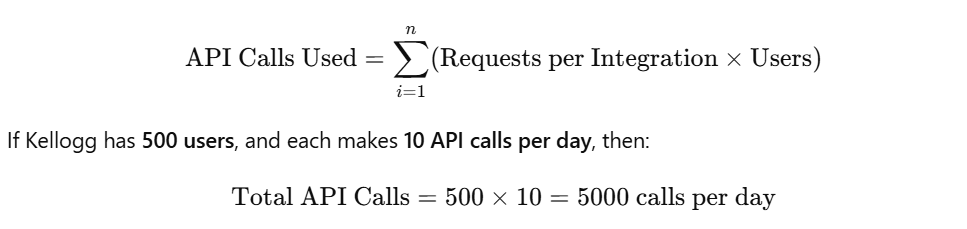
Salesforce Enterprise Edition allows 100,000 API calls/day, so we optimize batch processing to stay within limits.
17. What are the different ways to integrate external data sources with Salesforce?
There are several ways to integrate external data sources with Salesforce, depending on the use case, data volume, and real-time requirements. One of the most common approaches is API-based integration, where REST and SOAP APIs facilitate real-time data exchange. This method is ideal for applications that require instant data synchronization, such as customer portals or payment processing systems.
Another method is ETL (Extract, Transform, Load) tools like Informatica, Talend, or MuleSoft, which are used for batch data processing. This approach is useful for migrating historical data from legacy systems to Salesforce. Additionally, Salesforce Connect allows real-time access to external data without duplicating it inside Salesforce. This is particularly useful when integrating with large databases like SQL Server or Amazon Redshift, ensuring data consistency across platforms.
For ETL-based integration, we calculate data transfer rates to optimize batch jobs.
ETL Data Load Speed Formula:

We optimize this by parallel processing and bulk APIs.
18. How do you handle large data volumes in Salesforce efficiently?
Handling large data volumes (LDV) in Salesforce requires careful data management, indexing, and optimization techniques. One key approach is data archiving, where we store old or rarely accessed data outside Salesforce in external databases or BigQuery, reducing storage costs and improving system performance. Additionally, we use Skinny Tables to improve query performance for frequently accessed data by reducing the number of joins.
Another best practice is optimizing queries and reports using indexed fields. Salesforce automatically indexes standard fields like Record IDs and Foreign Keys, but for large datasets, I create custom indexes to speed up SOQL queries. For example, using SELECT Id, Name FROM Account WHERE Industry = ‘Retail’ on an indexed field ensures faster data retrieval. Moreover, implementing asynchronous processing using Batch Apex and Queueable Apex helps in handling bulk record updates efficiently.
Salesforce governor limits apply when dealing with bulk data updates. A key consideration is query performance.
Indexed SOQL Query Performance:
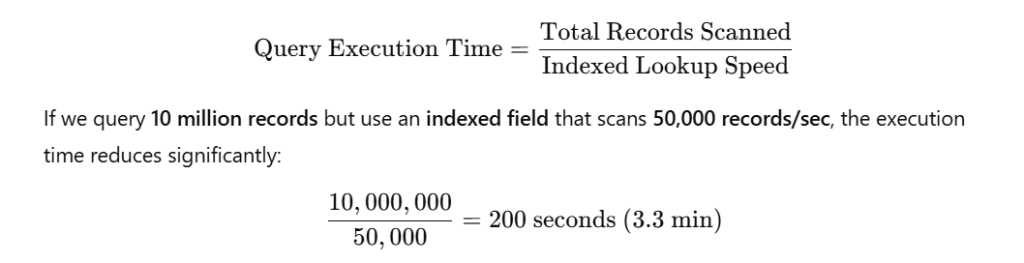
Indexing fields like CreatedDate and Custom Lookup Fields can improve performance.
19. What is the role of APIs in Salesforce integration?
APIs (Application Programming Interfaces) play a crucial role in Salesforce integration by enabling data exchange between Salesforce and external systems. We primarily use REST API and SOAP API for real-time data sharing. REST API is lightweight and used for mobile and web applications, while SOAP API is preferred for enterprise-level integrations that require secure and structured data transactions.
For REST API integration, we calculate the latency to ensure real-time updates.
API Latency Calculation:
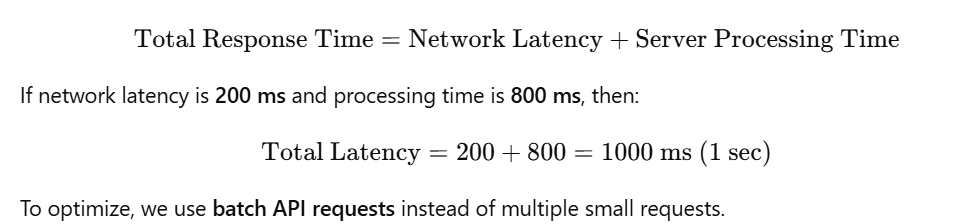
For example, if we need to fetch customer details from an external system, we can use a REST API callout:
HttpRequest req = new HttpRequest();
req.setEndpoint('https://api.kellogg.com/customer/123');
req.setMethod('GET');
Http http = new Http();
HTTPResponse res = http.send(req);
System.debug(res.getBody());
Code Explanation: This Apex code makes a REST API request to fetch customer data from an external service and logs the response. This ensures real-time customer data retrieval and keeps Salesforce synchronized with external applications.
20. How do you implement real-time data synchronization in Salesforce?
To implement real-time data synchronization, I use event-driven architecture and API-based integration. Platform Events and Change Data Capture (CDC) are effective for tracking changes in Salesforce records and sending updates to external systems. For instance, if a new order is placed, a Platform Event triggers an update in the ERP system.
Another method is using Streaming API, which allows external systems to subscribe to real-time updates from Salesforce. For example, if a customer updates their address, Salesforce instantly pushes this update to the customer portal. Additionally, for bidirectional synchronization, I use Webhooks and Middleware platforms (like MuleSoft or Boomi) to ensure data consistency between Salesforce and third-party applications. By implementing these strategies, I ensure accurate, real-time data exchange, improving business efficiency and decision-making.
For Change Data Capture (CDC) and Streaming API, we calculate the event processing rate.
Platform Event Processing Rate Formula:
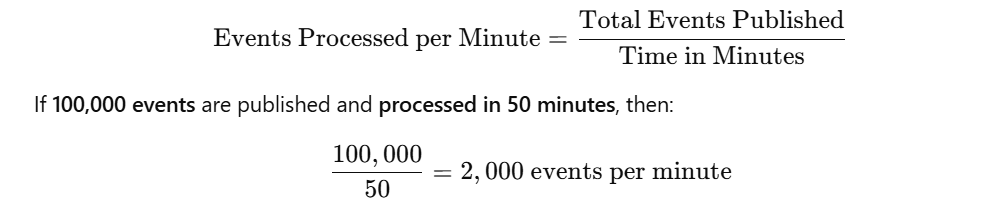
To handle high event loads, we use event batching and message queues.
Salesforce Marketing & Analytics
21. How does Kellogg leverage Salesforce Marketing Cloud for customer engagement?
At Kellogg, we use Salesforce Marketing Cloud to enhance customer engagement by delivering personalized, data-driven marketing campaigns. The platform enables us to create targeted email campaigns, SMS marketing, and social media ads based on customer behavior. With Journey Builder, we design automated customer journeys that send relevant content at the right time. For example, if a customer purchases a Kellogg product online, they receive a follow-up email with recipe ideas or discounts on complementary products.
Additionally, Marketing Cloud’s AI-driven insights help us analyze customer preferences and predict their future behavior. We use Einstein AI to segment audiences dynamically, ensuring that each customer receives tailored content. The platform also integrates with Sales Cloud and Service Cloud, allowing us to track customer interactions across multiple channels. By using real-time analytics, we continuously optimize our campaigns, resulting in higher engagement and conversion rates.
22. What are the key features of Pardot, and how does it benefit Kellogg?
Pardot is a powerful B2B marketing automation tool that helps Kellogg improve lead generation, nurturing, and conversion. One of its core features is Automated Lead Scoring, which ranks prospects based on their activity. For example, if a B2B customer downloads a Kellogg industry report, their score increases, making them a high-priority lead for the sales team.
Other key features of Pardot include:
Email Automation – Sends personalized emails based on user engagement.
Campaign Tracking – Monitors marketing ROI and conversion rates.
CRM Integration – Connects with Sales Cloud to streamline sales and marketing.
Einstein AI Analytics – Provides predictive lead scoring and deeper insights.
By leveraging Pardot, we automate marketing efforts, generate high-quality leads, and improve overall marketing efficiency.
23. How do you measure marketing campaign effectiveness using Salesforce?
Measuring a marketing campaign’s effectiveness in Salesforce involves analyzing multiple key metrics. We use Salesforce Reports and Dashboards to track customer engagement, conversion rates, and campaign ROI. The Campaign Influence Model helps us identify which marketing efforts contributed to sales and revenue. For instance, if a campaign generates 1,000 leads but only 50 convert, we assess the lead quality and adjust our strategy accordingly.
A key formula to measure Return on Investment (ROI) for a campaign is:
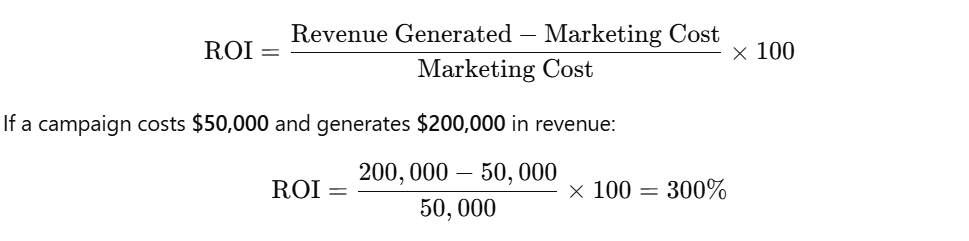
Additionally, Einstein Analytics provides AI-driven insights, helping us optimize campaigns, predict future trends, and maximize engagement.
24. How can AI-powered Salesforce Einstein improve customer insights?
Salesforce Einstein enhances customer insights by leveraging AI, predictive analytics, and automation. It helps us analyze past interactions to forecast customer preferences, allowing Kellogg to deliver personalized experiences. For example, if a customer frequently purchases protein bars, Einstein suggests offering discounts on similar products.
Key Einstein AI capabilities include:
Einstein Discovery – Detects patterns in customer data to optimize marketing.
Predictive Lead Scoring – Ranks leads based on the likelihood of conversion.
Automated Insights – Provides real-time recommendations for engagement.
With Einstein AI, we improve customer engagement, drive higher sales, and optimize our marketing strategies by making data-driven decisions.
25. What are the advanced analytics capabilities of Salesforce for business intelligence?
Salesforce offers powerful analytics tools like Tableau CRM (Einstein Analytics) for advanced business intelligence. At Kellogg, we use these tools to analyze sales trends, customer behaviors, and product performance. One major feature is Predictive Analytics, which helps forecast demand for specific products. For example, if cereal sales spike in winter months, we can increase production and marketing efforts accordingly.
Additionally, real-time dashboards allow us to track key metrics such as:
Sales Growth by Region
Customer Retention Rates
Campaign Performance
Product Profitability Analysis
For deeper insights, we use formulas in Tableau CRM:

By leveraging these advanced analytics tools, we make data-driven decisions, optimize marketing strategies, and drive business growth
Salesforce Training in Pune – Elevate Your Career Today!
Unlock new career opportunities with our Salesforce training in Pune, designed to provide a hands-on, immersive learning experience across Admin, Developer, and AI modules. Our expert-led sessions and real-world projects equip you with the skills to tackle complex CRM challenges effectively. By blending theory with practical applications, we ensure you gain a deep understanding of the Salesforce ecosystem in an engaging and impactful way.
With personalized mentorship, interview coaching, and certification guidance, we help you stay ahead in the competitive job market. Our program includes detailed study materials, project-based learning, and continuous support, empowering you to master Salesforce with confidence. Earn top certifications, enhance your expertise, and impress employers with in-demand skills.
Take the first step toward a successful Salesforce career—join our FREE demo session today!

