
External Credentials for OAuth Client Credentials Flow?

Question:
How can we use External Credentials and Named Credentials in Salesforce to authenticate and access a REST API that requires OAuth 2.0 Client Credentials flow (grant_type=client_credentials)?
The goal is to implement a secure and managed integration where Salesforce acts as a backend system calling an external API without requiring user authentication.
Answer:
The OAuth Client Credentials grant is designed for server-to-server integrations where an application (Salesforce) uses its own credentials (client ID and client secret) to obtain an access token. As of Winter ’24, Salesforce natively supports this flow using External Credentials (EC) and Named Credentials (NC).
CRS Info Solutions offers expert Salesforce online training with real-time projects, certification guidance, interview coaching, and a job-ready approach. Enroll for free demo today!!!
1. Configure External Credentials
Go to Setup → External Credentials and create a new External Credential.
Credential Settings:
Use OAuth 2.0 with the Client Credentials flow and Client Secret for authentication. Set the Identity Provider URL to the external API’s OAuth token endpoint. Enable “Pass client credentials in request body” if the API requires it.
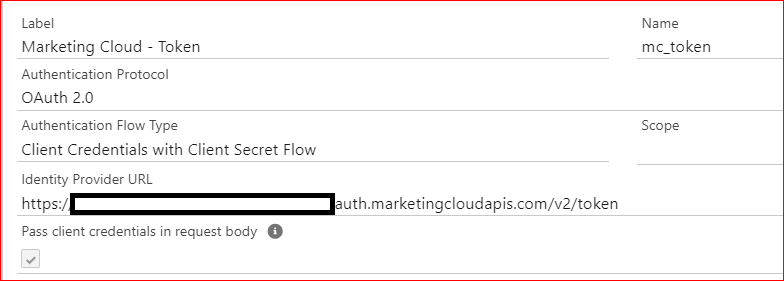
Some OAuth providers only accept credentials in the request body, while others allow them in the Authorization header. If not configured correctly, you might get an error like:
System.CalloutException: Unable to fetch the OAuth token. Error: invalid_request.Principal Settings:
Create a Principal that represents Salesforce as the OAuth client. Provide:
Provide a name as a label for your integration. Enter the Client ID obtained from the external API and the Client Secret provided by the API. These credentials authenticate your integration with the external service.
Editing the External Credential later will require reapplying the client credentials.
2. Configure Named Credentials
Go to Setup → Named Credentials and create a new Named Credential.
Set the URL as the base URL of the external API and enable callouts. Select the external credential configured in Step 1. Under callout options, check “Generate Authorization Header” to automatically inject the OAuth token.
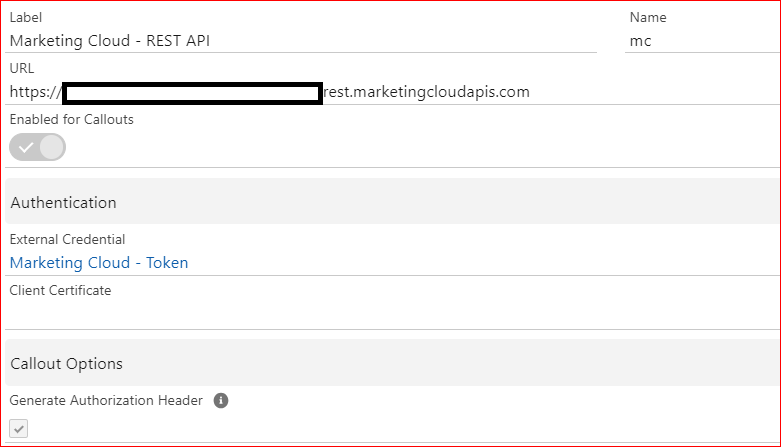
3. Grant Permissions
Users making the callout must be granted access to the External Credential.
In Setup, go to External Credential Principal Access, click Edit, and select the EC/Principal. After selecting the appropriate combination, confirm your changes. Finally, save the configuration to apply the access settings.
Before Winter ’25, you also need to manually assign permissions for User External Credentials on profiles or permission sets.
4. Make the API Callout in Apex
Use the Named Credential to make an authenticated API request.
String body = '{"email": "foobar@gmail.com", "validators": ["SyntaxValidator", "MXValidator"]}';

HttpRequest req = new HttpRequest();
req.setEndpoint('callout:My_Named_Credential/address/v1/validateEmail');
req.setMethod('POST');
req.setBody(body);

Http http = new Http();
HttpResponse res = http.send(req);
System.debug(res.getBody());
If everything is configured correctly, you should receive a response like:
{"email":"foobar@gmail.com","valid":true}5. Make the API Callout in Flow
You can also perform the same operation using a Flow HTTP Callout.
Create an HTTP Callout action and link it to the Named Credential, specifying the relative API path (e.g., /address/v1/validateEmail) along with a sample request and response. Wire the request and response fields in a Screen Flow to capture user input, invoke the API, and display the result. This setup enables seamless integration of external API calls within a Flow.
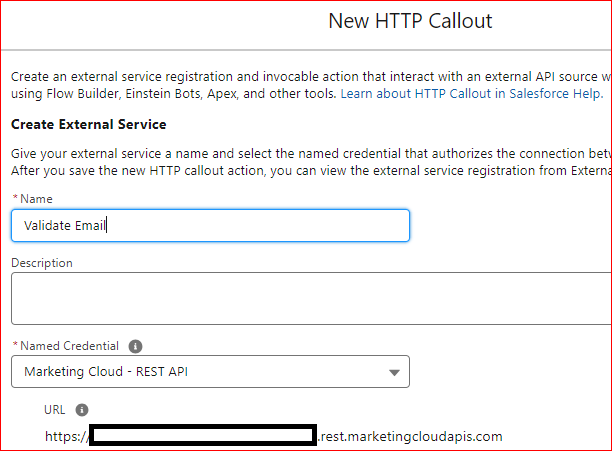
In Flow debug logs, you will see:
VALIDATEEMAIL.VALIDATE EMAIL (EXTERNAL SERVICES): Validate Email (API)
Inputs:
body = { "email": "foobar@gmail.com", "validators": ["SyntaxValidator", "MXValidator"] }

Outputs:
responseCode (200)
{"email":"foobar@gmail.com","valid":true}
Additional Notes
Salesforce may add extra _set keys (e.g., email_set, valid_set) when using External Services in Flow. While most APIs ignore these, strict parsers might reject the request.
With this setup, Salesforce securely authenticates and calls an external API using OAuth 2.0 Client Credentials flow without storing tokens in Apex or hardcoding credentials.
Master Salesforce with Expert Training in Pune
Elevate your career with our Salesforce training program in Pune, designed for aspiring Admins, Developers, and AI professionals. Our expert-led certification guidance ensures you’re equipped with the knowledge and skills needed to excel in the Salesforce ecosystem.
Our training combines in-depth theory with practical, hands-on sessions to help you bridge the gap between learning and real-world application. Salesforce training in Pune With personalized support, advanced interview preparation, and industry-focused tools, we prepare you to confidently tackle the challenges of a competitive job market.
Don’t miss this opportunity—sign up for a free demo class today and take the first step toward a thriving career in Salesforce!!!

