
What Is AI Model Serving? How Do You Make a Trained Model Available to Users?
Introduction
Machine Learning is transforming the way businesses, educational institutions, healthcare organizations, and technology companies operate. From predicting customer behavior to detecting fraudulent transactions and supporting decision-making, Machine Learning models are being used in many real-world applications. However, developing and training a Machine Learning model is only one part of building a complete AI-powered solution. After a model has learned patterns from data, it must be made available to applications and users so that it can generate predictions on new, unseen inputs. This process is known as AI Model Serving.
Imagine that we have trained a Machine Learning model to predict whether a student will pass or fail an examination based on their marks. During training, the model learns from historical student data containing marks and exam outcomes. Once training is complete, the model may be capable of predicting outcomes for new students. But how can a teacher use it? How can a student enter marks into a website and receive a prediction? The model needs to be deployed, connected to an application, and made accessible through a reliable interface. Model serving makes this possible.
What Is AI Model Serving?
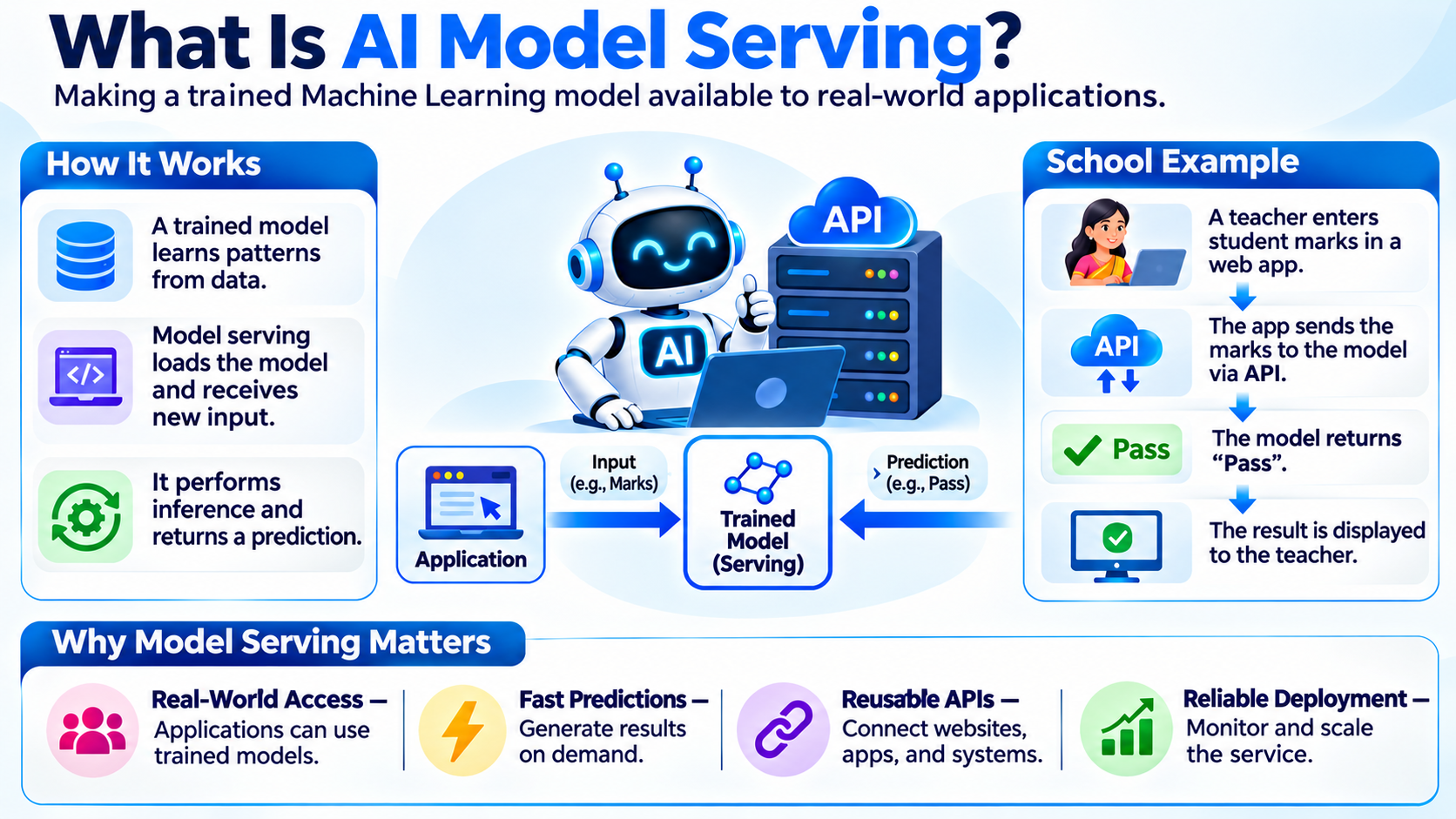
AI Model Serving is the process of making a trained Machine Learning model available for use in real-world applications. It allows applications to send new input data to the model and receive predictions in response. These predictions can then be displayed to users, stored in a database, or used by other application components to support further actions.
A trained model contains learned parameters and patterns derived from its training data. Model serving provides the software and infrastructure required to load that model, receive incoming requests, perform inference, and return results. In simple terms, training teaches the model how to make predictions, while serving allows people and applications to use what the model has learned.
For example, a school may use a student performance prediction model. A teacher enters a student’s marks into a web application. The application sends those marks to the model through an API. The model processes the input and returns a prediction such as “Pass.” The application then displays the result to the teacher. The teacher does not need to understand the internal Machine Learning algorithm or access the model file directly.
Enroll for free demo on our most trending AI & ML Artificial Intelligence and Machine Learning Course
Why Is Model Serving Important?
A Machine Learning model has limited practical value if it remains only as a file on a developer’s computer. To create real-world value, the model must be accessible to the systems and people who need its predictions. Model serving bridges the gap between model development and real-world application use.
It allows websites, mobile applications, business platforms, and other software systems to use trained models without having to implement the underlying Machine Learning logic themselves. It also helps developers manage how predictions are requested and returned, making it easier to integrate AI capabilities into existing applications.
Model serving is also important for scalability and reliability. A model may receive only a few requests during testing but thousands or millions of requests after being introduced into a production application. A well-designed serving system can be configured to handle increasing demand, manage computing resources, and provide consistent responses. It also enables teams to monitor the model’s behavior and update it when necessary.
How Does AI Model Serving Work?
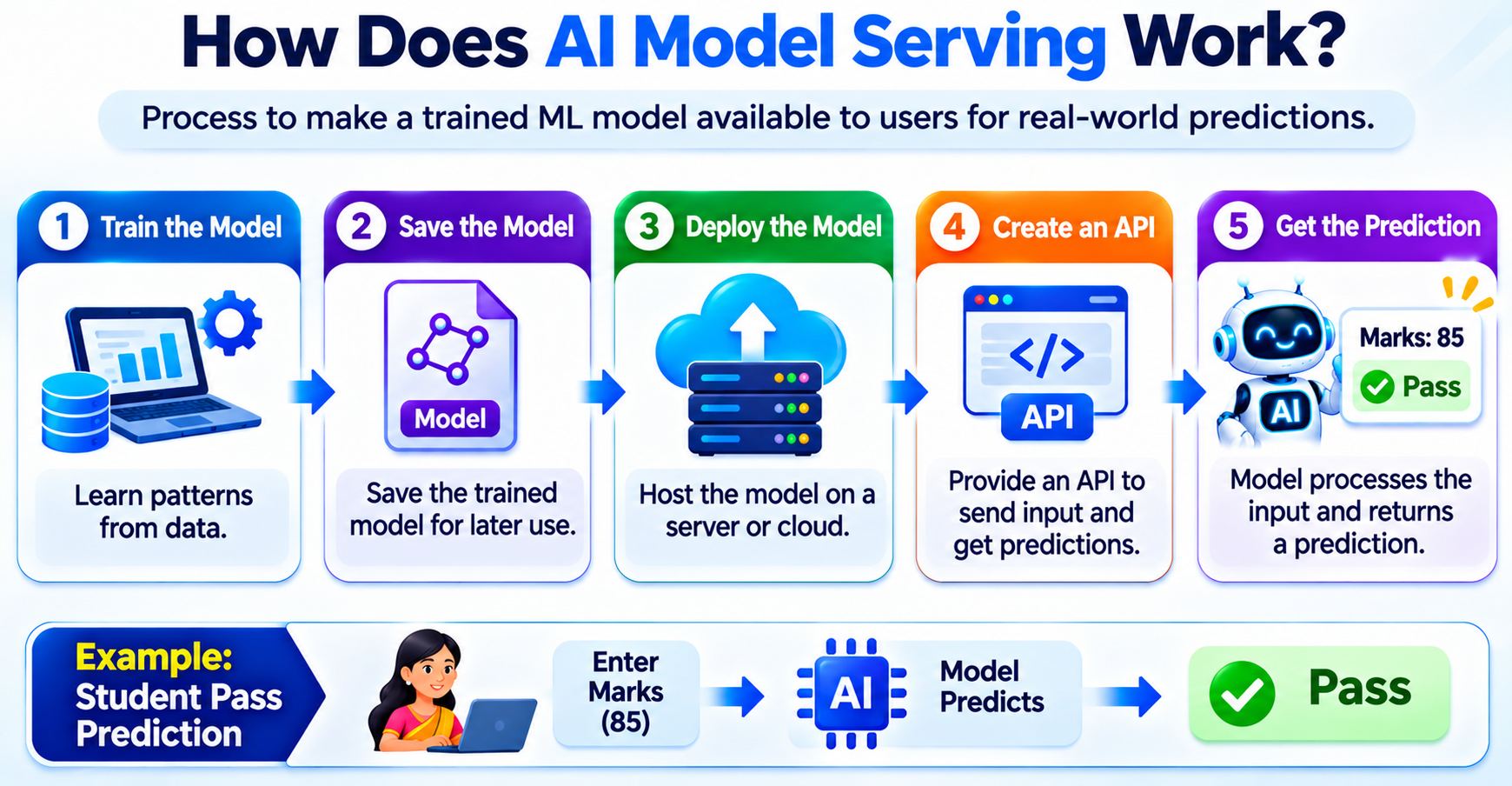
The model-serving process generally begins after model training and evaluation are complete. The trained model is saved, deployed to an environment where it can run, and connected to an application through an API. When a user submits input, the application sends a request to the serving system. The model processes the input and returns a prediction, which the application presents to the user.
Step 1: Train the Model
The first step is to train a Machine Learning model using relevant data. During training, the model identifies patterns and relationships that help it make predictions. For example, a student performance model may learn from historical student marks, attendance information, and known exam outcomes.
The quality and relevance of the training data influence how well the model performs on new inputs. Developers typically evaluate the model before making it available to users. This evaluation helps determine whether the model is suitable for its intended purpose and whether its predictions are sufficiently reliable.
Step 2: Save the Trained Model
After training and evaluation, the model is saved in a format that can be loaded later. Saving the model preserves its learned parameters so that the application does not need to retrain it every time a prediction is requested.
Depending on the Machine Learning framework, the saved model may be stored as a file or as an artifact in a model registry or storage system. The model artifact may also be associated with information about its version, training data, and evaluation results. This helps developers identify which model is being used in a deployed application.
Step 3: Deploy the Model
Deployment means placing the trained model in an environment where it can receive prediction requests. This environment may be a local server, a cloud platform, a containerized application, or another infrastructure designed to run software services.
The deployment environment must have access to the model file, required libraries, and computing resources. Developers also configure the service so that authorized applications can communicate with it. Depending on the use case, the model may run on a CPU, GPU, or specialized inference hardware.
Step 4: Create an API
An API, or Application Programming Interface, provides a standard way for an application to communicate with the model-serving system. The application sends input data in a request, and the serving system returns the model’s prediction in a response.
For example, a student performance application may send a student’s marks to an API endpoint. The API receives the request, validates the input, passes the data to the model, and returns the prediction. APIs commonly use formats such as JSON to exchange data between applications and services.
This approach makes the model reusable. A website, mobile application, or school management system can access the same model through its API without needing to know how the model was trained or implemented.
Step 5: Generate and Return the Prediction
When a request reaches the model-serving system, the input is prepared in the format expected by the model. This may include checking required fields, converting data types, and applying the same preprocessing steps used during training.
The model then performs inference, which means using its learned patterns to generate a prediction for the new input. The serving system returns the prediction to the application, which can display it to the user or use it in another process.
Suppose a student enters marks of 85. The application sends the marks to the model, and the model returns a prediction such as “Pass.” The application receives the response and displays the result. This prediction is generated using the already-trained model; it is not a new training process.
A Real-World Example: Student Pass or Fail Prediction
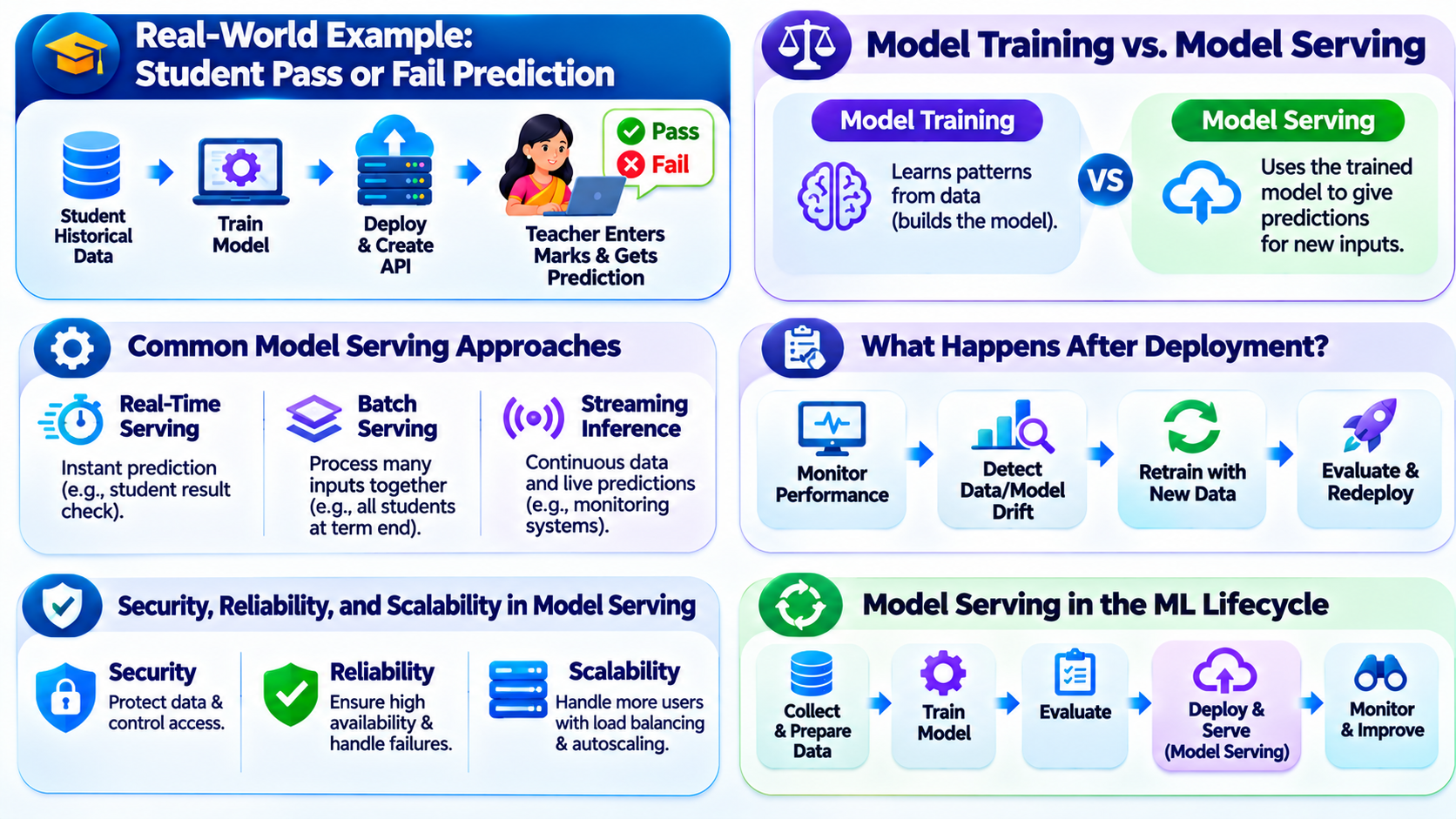
Consider a school that wants to build an application to estimate whether students are likely to pass an examination. The development team collects historical student data containing marks and known outcomes. They use this data to train a Machine Learning model and evaluate its performance.
After training, the team saves the model and deploys it to a server. They create an API that allows the school’s application to send student information to the model. A teacher opens the application, enters a student’s marks, and submits the request.
The application sends the input to the API. The model processes the information and returns a prediction. The application then displays the result to the teacher. If the model predicts that the student may fail, the teacher can use that information to provide additional support.
This example demonstrates how training and serving work together. Training creates the model’s ability to make predictions, while serving makes that ability available through an application. In an educational setting, predictions should be treated as estimates rather than guaranteed outcomes, and they should support—not replace—professional judgment.
Model Training vs. Model Serving
Model training and model serving are closely related, but they have different purposes. Training is the process of learning patterns from a dataset. It usually happens during model development or when the model needs to be updated with new data. Serving is the process of using the trained model to make predictions on new inputs. It happens whenever an application or user requests an inference.
Training can be computationally intensive and may take considerable time, depending on the dataset, algorithm, and hardware. Serving is designed to respond to requests efficiently, with attention to response time, availability, and reliability. A model can be trained once and then serve many prediction requests until it needs to be updated or replaced.
Read Also: What Is the AI Model Lifecycle? How Do You Take a Model from Development to Production?
Common Model Serving Approaches
Model serving can be implemented in different ways depending on the application’s requirements. In real-time serving, an application sends a request and expects a prediction immediately or within a short response time. This approach is useful for applications such as fraud detection, recommendation systems, and interactive student prediction tools.
In batch serving, the system processes many inputs together rather than responding to each request individually. For example, a school may generate predictions for all students at the end of a term. Batch processing can be useful when immediate responses are not required and large amounts of data need to be processed efficiently.
Some applications also use streaming inference, where data arrives continuously and predictions are generated as new events are received. This can be useful for monitoring systems, sensor data, and applications that need to respond to ongoing activity.
What Happens After Deployment?
Deploying a model is not the end of the process. A model-serving system needs to be monitored to ensure that it continues to operate correctly. Developers may track response times, request volumes, errors, resource usage, and prediction behavior. Monitoring helps teams identify operational problems and determine whether the service is meeting its performance requirements.
Teams may also monitor changes in incoming data. If real-world data begins to differ significantly from the data used during training, the model’s performance may decline. This is often called data drift or model drift, depending on what changes and how the change affects the model.
When a model becomes outdated or its performance declines, the development team may collect newer data, retrain the model, evaluate the updated version, and deploy it through the serving system. A controlled update process helps ensure that a new model does not unexpectedly disrupt the application.
Security, Reliability, and Scalability in Model Serving
A production model-serving system must consider more than prediction accuracy. It should protect the model and the data sent to it. Authentication and authorization can help ensure that only approved applications and users access the service. Sensitive input data should be handled carefully, and the system should follow appropriate privacy and security requirements.
Reliability is also important. If the serving service becomes unavailable, applications may not be able to obtain predictions. Developers can improve reliability through health checks, error handling, logging, and suitable infrastructure. They may also configure timeouts and fallback behavior so that an application can respond gracefully when the model cannot provide a prediction.
Scalability refers to the ability to handle changes in request volume. As more users access an application, the serving system may need additional computing resources or multiple instances of the model. Load balancing and autoscaling can help distribute incoming requests and adapt resources to demand.
Model Serving in the Machine Learning Lifecycle
Model serving is one stage in the broader Machine Learning lifecycle. The lifecycle begins with collecting and preparing data, selecting an algorithm, training the model, and evaluating its performance. Once the model is suitable for use, it is deployed and served to applications.
After deployment, the model is monitored. New data and feedback may reveal opportunities to improve it. The model can then be retrained, evaluated, and redeployed. This process connects experimentation and development with the ongoing operation of an AI-powered application.
Conclusion
AI Model Serving is a critical step in turning a trained Machine Learning model into a practical real-world capability. It connects the model to applications through deployment infrastructure and APIs, allowing users to submit data and receive predictions.
Remember the basic distinction: model training teaches the model using data, while model serving makes the trained model available for inference. A successful AI application needs both a model that performs well and a reliable, secure, and scalable way to deliver its predictions to users.
Read Also: What Is the Attention Mechanism in AI? A Complete Guide with Real-World Examples

