
Understanding Salesforce AI Agents: A Complete Guide to Agentforce, Architecture, Real-World Applications, and the Future of AI-Powered CRM
Artificial intelligence is transforming the way businesses manage customer relationships, automate workflows, and deliver personalized experiences. Traditional CRM systems help organizations store customer information, track sales opportunities, manage service requests, and organize business operations. However, modern businesses increasingly want their systems to do more than store and display information. They want intelligent systems that can understand requests, identify relevant information, recommend next steps, and perform approved business actions.
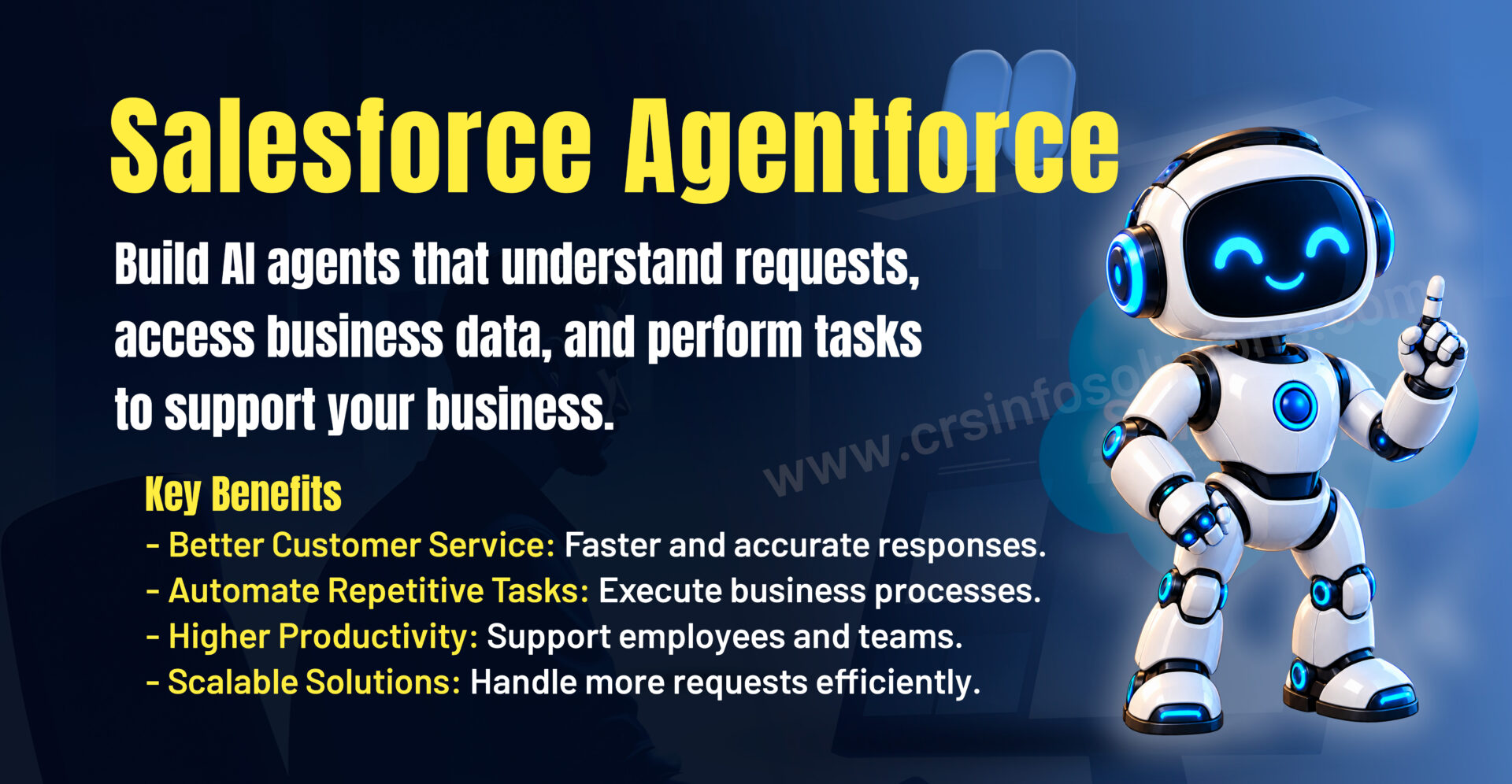
This is where Salesforce Agentforce becomes important.
Agentforce enables organizations to build and deploy AI agents that can support business processes, interact with customers and employees, and perform tasks within defined instructions, permissions, and operational boundaries. Rather than simply responding to a question with a predefined message, an AI agent can use available information and configured actions to help complete a task.
For example, imagine a customer contacting an organization to check an order status. A traditional chatbot might provide a list of frequently asked questions or ask the customer to navigate to another page. An appropriately configured AI agent may be able to identify the customer’s request, retrieve authorized order information, explain the current status, and guide the customer through the next step.
This represents an important shift from conversational interfaces that primarily provide information toward AI-powered systems that can help execute business processes.
In this comprehensive guide, we will explore Salesforce AI agents, Agentforce architecture, reasoning, actions, data grounding, security, practical business examples, implementation strategies, limitations, and career opportunities. Whether you are a Salesforce Administrator, Developer, Consultant, student, or business professional, this article will help you understand the fundamentals of AI agents and their role in modern CRM systems.
See also: Best institute for Salesforce Online Training
What Is Salesforce Agentforce?
Salesforce Agentforce is Salesforce’s platform for building, configuring, testing, and deploying AI agents for business use cases. These agents can be designed to assist customers, support employees, help sales teams, and participate in defined business workflows.
An Agentforce agent operates according to its configuration, available instructions, accessible data, and permitted actions. Depending on the use case and implementation, it may answer questions, retrieve information, summarize records, create or update records, or invoke other supported business processes.
The important distinction is that an AI agent is not simply a language model generating text. It can combine language understanding with business context and configured capabilities to help accomplish a task.
Consider a customer service department that receives hundreds of questions about product delivery, returns, account details, and service requests. An organization could configure an agent to handle selected requests using approved knowledge sources and authorized actions. Questions that fall outside the agent’s scope can be directed to a human representative.
This approach can help organizations reduce repetitive work while allowing employees to focus on complex customer requirements.
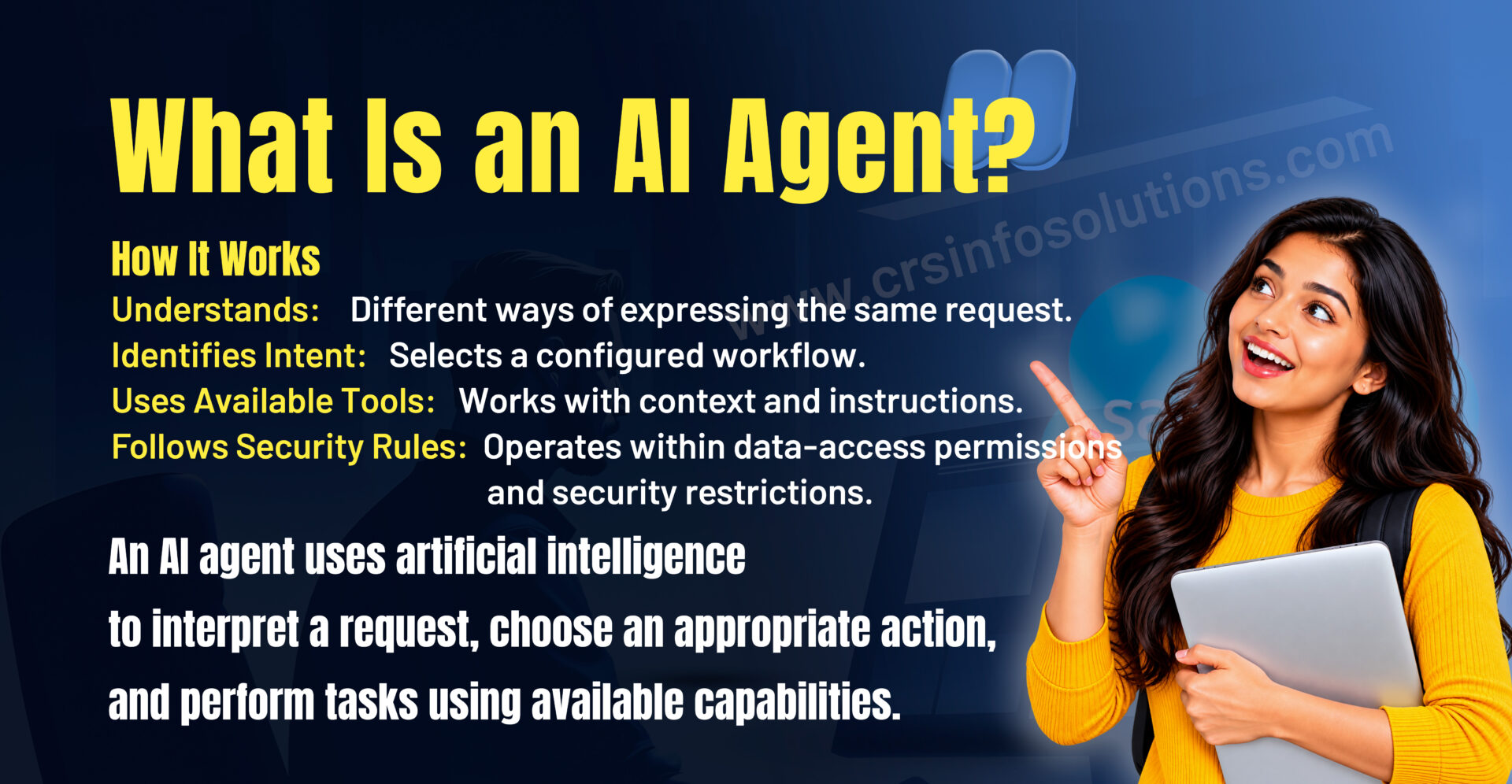
An AI agent is a software system that uses artificial intelligence to interpret a request, determine an appropriate course of action, and perform tasks using the capabilities available to it.
Unlike a basic rule-based chatbot, an AI agent may interpret different ways of expressing the same request and choose among multiple configured actions. Its behavior depends on the model, instructions, context, tools, and restrictions provided by the implementation.
For example, consider these three customer messages:
“Can you check my order?”
“Where is my package?”
“Has my delivery been shipped?”
Although the wording differs, all three requests may relate to order status. An appropriately designed agent can interpret the customer’s intent and select a suitable workflow.
However, the agent must still have access to the necessary order information and an authorized method for retrieving it. Understanding the request does not automatically give the agent permission to access every record or system.
This is why business context, data access, action configuration, and security are essential parts of AI agent design.
AI Agent vs. Traditional Chatbot: What Is the Difference?
Traditional chatbots often rely on predefined conversation paths, keywords, scripted responses, or decision trees. They can be useful for predictable interactions, such as providing office hours or directing users to a support page.
AI agents can support more flexible interactions by interpreting natural language and selecting from available actions according to their instructions and configuration.
A traditional chatbot might respond to “I need help with my recent order” by displaying a link to the order tracking page. An AI agent, if properly configured and authorized, may retrieve the relevant order information and explain the current status directly.
The difference is not that every chatbot is incapable of performing actions or that every AI agent is fully autonomous. Modern chatbots can also connect to business systems, and AI agents can be limited to simple tasks. The practical distinction depends on the system’s capabilities, design, and permitted level of autonomy.
Why Are AI Agents Important for Modern CRM?
Customer Relationship Management systems contain valuable information about customers, sales activities, service cases, products, and business interactions. Employees frequently need to search this information, interpret it, and take action based on what they find.
These activities can consume considerable time when they involve repetitive questions, manual record updates, or information spread across different systems.
AI agents can help by connecting conversational interaction with approved business data and actions.
For customer service, an agent may answer common questions and assist with case management. For sales, it may summarize opportunity information and help representatives prepare for customer meetings. For internal operations, it may guide employees through established procedures or retrieve relevant company knowledge.
The potential benefits include faster responses, reduced repetitive work, improved access to information, and more consistent execution of defined processes.
These outcomes are not automatic. They depend on data quality, the usefulness of the selected use case, system integration, testing, security controls, and employee adoption.
How Does Salesforce Agentforce Work?
To understand Agentforce, imagine an employee or customer interacting with an AI agent through a supported channel. The agent receives a request, interprets the intent, evaluates the available context, and determines which configured capability can help.
A simplified interaction may involve the following stages.
Step 1: The Agent Receives a Request
The interaction begins when a user asks a question or a supported event initiates a workflow.
For example, a customer might ask, “Can you tell me the status of my support case?”
The agent receives the message through the configured experience. Depending on the implementation, this could be a website, messaging interface, employee workspace, or another supported channel.
Step 2: The Agent Interprets the Request
The agent uses its configured instructions and AI capabilities to understand what the user wants to accomplish.
In this example, the intent is to obtain support case information. The agent may need to identify the relevant customer, establish which case is being discussed, and determine what information is required.
If important details are missing, a well-designed agent may ask a follow-up question instead of guessing.
Step 3: The Agent Selects an Appropriate Capability
The agent determines which configured action or workflow can address the request. Depending on the implementation, this could involve searching approved knowledge, retrieving a Salesforce record, or invoking a supported automation.
For example, an action might retrieve a case number, status, subject, or latest update.
The agent should use only the capabilities made available to it and operate within the applicable access controls.
Step 4: The Agent Retrieves Relevant Information
The agent may need information from Salesforce records, approved knowledge articles, or connected data sources.
The information available depends on the implementation, data connections, retrieval configuration, and permissions. An agent cannot reliably answer a question about information it cannot access.
Step 5: The Agent Performs an Approved Action
When the request requires an action, the agent can use an appropriate configured capability if the necessary conditions are satisfied.
For example, it might retrieve a case record, create a task, or initiate a supported workflow. Actions that modify important records may require additional validation, authorization, or human approval depending on the business requirements.
Step 6: The Agent Communicates the Result
After receiving the result, the agent explains the outcome in natural language.
For example, it may tell the customer that a case is still open and provide the latest available update.
If the request cannot be completed, the agent should communicate the limitation, request additional information, or route the issue to an appropriate human representative.
This process illustrates how an AI agent combines language understanding, context, data access, configured actions, and response generation to support a business task.
See also: Salesforce Interview questions and answers
Understanding the Salesforce Agentforce Architecture
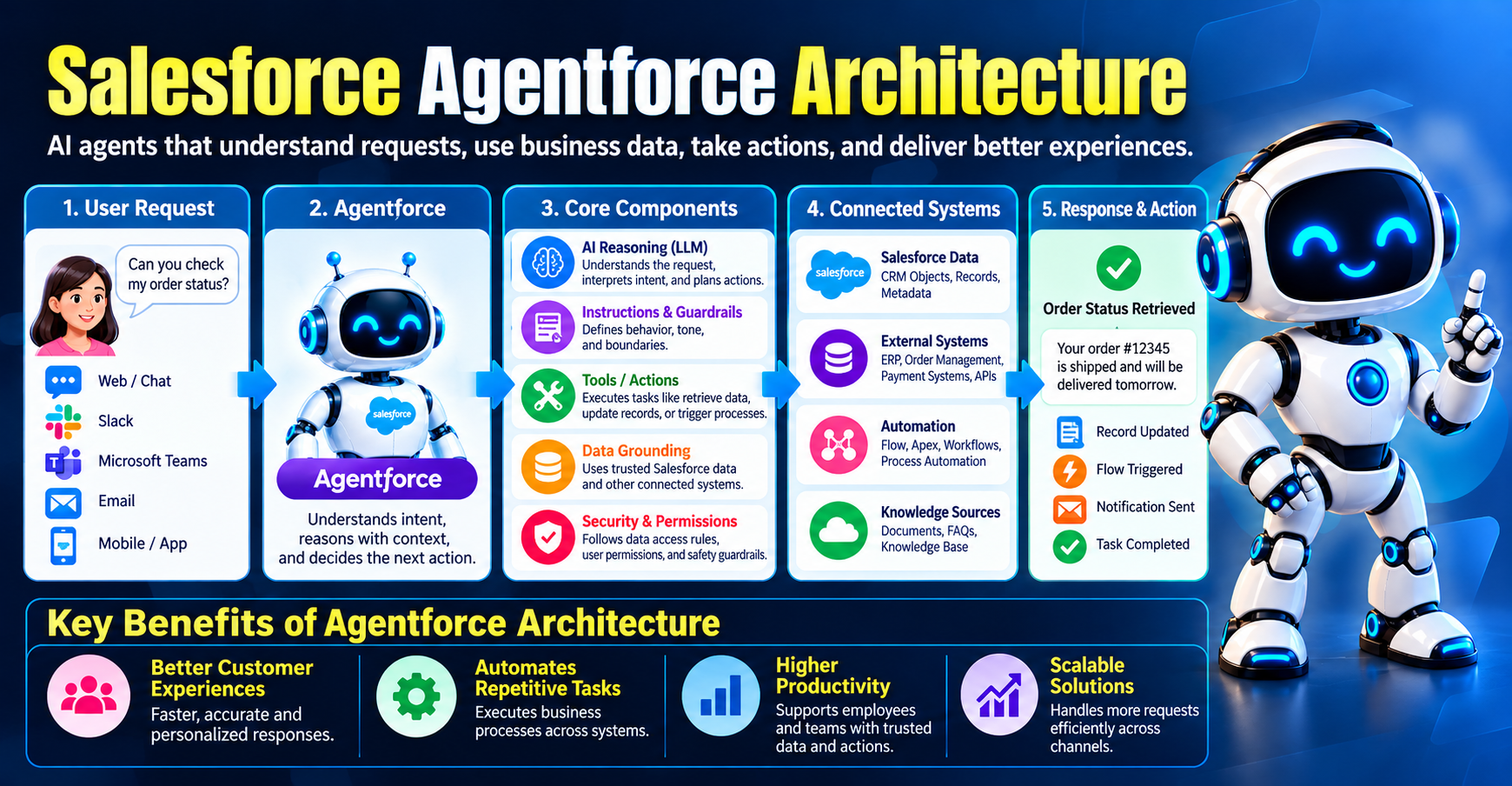
Agentforce implementations can contain several connected components. Understanding their roles helps administrators and developers design agents that are useful, secure, and maintainable.
1. Agent Configuration and Instructions
Agent configuration defines the agent’s purpose, behavior, available capabilities, and operational boundaries.
Instructions help explain what the agent should do, how it should respond, which tasks it should prioritize, and when it should request additional information or escalate a request.
For example, a customer service agent might be instructed to answer product questions using approved company knowledge and avoid making unsupported promises about delivery dates.
Clear instructions reduce ambiguity and help align the agent’s behavior with business requirements. However, instructions alone cannot guarantee correct behavior, so testing and technical controls are also necessary.
2. Topics, Subagents, and Task Organization
Agentforce terminology and configuration options can evolve between releases. In newer Agentforce experiences, the term subagent is used for specialized capabilities in supported configurations, while topics may appear in earlier designs or other Agentforce contexts.
The underlying design principle is to organize responsibilities into manageable areas.
For example, a customer service implementation may separate order inquiries, product information, return requests, and case assistance into distinct areas of responsibility. Each area can have appropriate instructions and supported actions.
This modular approach can make an agent easier to test, maintain, and improve.
3. Actions
Actions allow an agent to interact with business capabilities rather than merely describe what should happen.
Depending on the implementation, actions may invoke Salesforce Flow, Apex, supported APIs, or other configured capabilities.
For example, an action could retrieve an account’s approved information, create a follow-up task, or initiate a case-management process.
An action should have a clear purpose, appropriate input parameters, defined outputs, and suitable error handling. Its permissions and effects should be reviewed carefully, especially when it can modify business records.
4. Data and Grounding
Grounding means providing the AI with relevant, trustworthy information so its responses are based on the available business context.
Salesforce records, approved knowledge articles, and connected data sources may provide this context when configured appropriately.
For example, a product support agent should use approved product documentation rather than inventing technical specifications.
Salesforce Data Cloud, now branded Data 360, can support data-related use cases where the relevant capabilities and configuration are available. The exact data architecture depends on the organization’s requirements and licensed products.
5. Reasoning and Orchestration
Reasoning and orchestration help determine which capabilities to use and in what order.
Salesforce has described Atlas as part of its Agentforce reasoning architecture. The exact underlying models and orchestration behavior can vary by product version and configuration.
Imagine a customer requesting a refund. The agent may need to identify the order, retrieve the applicable policy, verify eligibility, and then determine whether it can proceed or should route the request for review.
This is more involved than generating a sentence because the system must select and coordinate the relevant capabilities while following business rules.
6. Trust, Security, and Governance
AI agents operate within a business environment where data privacy, access control, and reliability matter.
Salesforce provides platform security features and trust-related capabilities, including the Einstein Trust Layer in applicable experiences. Organizations must still configure permissions, data access, testing, and governance appropriately.
Security should be considered throughout the implementation rather than added only after an agent has been built.
What Is the Atlas Reasoning Engine?
The Atlas reasoning engine is a term associated with Salesforce’s Agentforce architecture. It relates to the process through which an agent interprets a request and coordinates the capabilities available to it.
To understand the concept, consider an employee who asks an agent to summarize an account before an important meeting.
The agent may need to retrieve account details, review recent activities, identify related opportunities, and organize the information into a useful summary. The implementation determines which data sources and actions are available and how those capabilities are coordinated.
This example demonstrates why agent behavior involves more than text generation. The system must connect a request to relevant information and suitable operations.
It is important to distinguish a simplified conceptual explanation from a precise description of internal product implementation. The specific reasoning process can vary with the product version, selected models, and configured features.
Understanding Retrieval-Augmented Generation (RAG) in Agentforce
Retrieval-Augmented Generation, commonly called RAG, is an approach that combines information retrieval with AI-generated responses.
Instead of relying exclusively on information learned during model training, a RAG-based system retrieves relevant information from a selected knowledge source and uses that information as context for generating a response.
Consider a company with hundreds of product manuals, troubleshooting guides, and customer support articles. A support agent needs to answer a question about a particular product’s warranty.
A retrieval system can search the approved knowledge sources for relevant warranty information. The AI then uses the retrieved material to help formulate an answer.
This approach can improve relevance and provide more current or organization-specific context, depending on the quality and freshness of the source data.
RAG does not eliminate every possibility of an incorrect answer. Retrieval may return incomplete information, the source itself may be inaccurate, or the AI may misinterpret the retrieved content. Proper evaluation, source management, and response validation remain important.
See also: Salesforce Apex Interview Questions
Real-World Salesforce Agentforce Use Cases
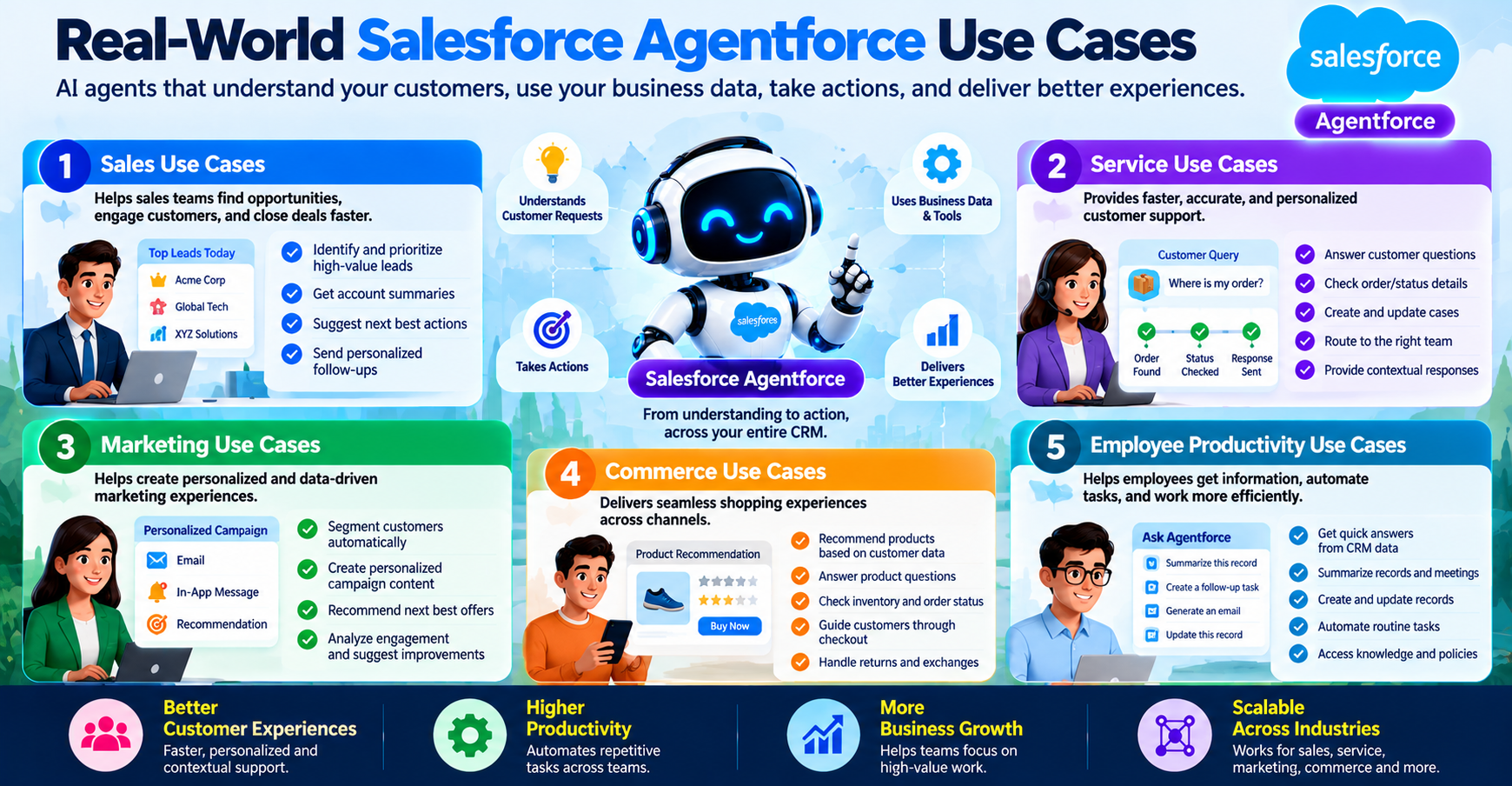
1. Customer Service and Support
Customer service is a natural use case for AI agents because support teams often receive large volumes of recurring questions.
An appropriately configured service agent can help customers find answers, retrieve authorized case information, follow troubleshooting procedures, and initiate supported workflows.
For example, a customer reports that a product is not working as expected. The agent can ask clarifying questions, retrieve the relevant troubleshooting guide, and suggest approved diagnostic steps.
If the issue requires technical judgment, special authorization, or an action outside the agent’s scope, it can route the interaction to a human representative.
The goal is not necessarily to eliminate human support. It is to help resolve suitable requests efficiently while preserving access to human expertise.
2. Sales and Opportunity Management
Sales representatives often spend time reviewing account history, preparing for meetings, updating records, and organizing follow-up activities.
An AI agent may assist with these tasks by summarizing available account information, highlighting recent interactions, preparing meeting briefs, or helping create follow-up tasks.
For example, before a meeting with a prospective customer, a sales representative might request a summary of recent communications and open opportunities.
The agent could compile a summary from authorized information and help the representative identify questions that require further investigation.
Any recommendations should be treated as decision support rather than guaranteed predictions. Sales representatives remain responsible for reviewing important information and making appropriate business decisions.
3. E-Commerce and Order Tracking
An online retailer may receive repeated questions about shipping, order status, product availability, and return policies.
An order support agent could retrieve relevant information from connected systems and provide an appropriate response.
For example, when a customer asks whether an order has shipped, the agent may retrieve the order status through an approved integration and explain the result.
If the customer requests a return, the agent may explain the policy and initiate a supported return workflow when eligibility conditions are met.
Access to order records must be controlled carefully so that customers cannot retrieve another person’s private information.
4. Employee Support and Internal Knowledge
Organizations maintain internal documentation about policies, procedures, software, onboarding, and employee services. Employees may spend time searching multiple systems to find the information they need.
An internal AI agent can help employees locate approved information and understand established procedures.
For example, a new employee might ask how to request access to a business application. The agent could retrieve the relevant internal procedure and guide the employee through the appropriate steps.
If a request requires manager approval or a restricted administrative action, the agent should direct the employee to the authorized process rather than bypassing it.
5. IT Service Management
IT departments often handle requests involving access, device troubleshooting, software installation, and service incidents.
An IT support agent may assist with approved troubleshooting steps, retrieve relevant knowledge articles, or create service tickets.
For instance, an employee who cannot access an application may receive a guided troubleshooting sequence. If the problem persists, the agent could help collect diagnostic details and initiate a support case.
Sensitive actions, such as changing access permissions or resetting credentials, require appropriate identity verification and security controls.
6. Financial Services and Insurance
Financial institutions and insurance providers manage large volumes of customer enquiries and documentation. AI agents may help users locate approved information, understand routine procedures, or navigate service workflows.
For example, an insurance service agent might explain the documents required to submit a claim and provide the status of an authorized case.
However, high-impact financial decisions, claim approvals, eligibility determinations, and other regulated processes require appropriate oversight and controls. An AI agent should not be assumed to have authority to make these decisions simply because it can answer related questions.
Agentforce in Action: A Practical Customer Support Example
Imagine a company called BrightTech that sells electronic products and uses Salesforce to manage customer service.
A customer contacts the company and says, “My laptop is overheating. Can you help me?”
A properly configured support agent could follow a structured process.
First, it identifies the request as a product troubleshooting issue. It asks for the model or product identifier if that information is required.
Next, it retrieves the relevant troubleshooting guidance from approved company knowledge. It provides safe, documented steps and asks the customer whether the issue continues.
If the problem remains unresolved, the agent can collect relevant details and create or update a support case using an authorized action.
The case may include the product model, a description of the issue, troubleshooting steps already attempted, and the customer’s responses.
Finally, the agent explains what happens next. If the case requires a specialist, it routes the request through the company’s established escalation process.
This example illustrates how an agent can connect conversation, knowledge retrieval, Salesforce records, and business workflows.
The exact behavior depends on how the company configures the agent, which actions it provides, and what its security policies permit.
Understanding Agentforce Actions with a School Example
For beginners, business examples can make AI agent concepts easier to understand.
Imagine a school that maintains student information in Salesforce. The school uses an AI agent to help authorized staff with routine administrative tasks.
A teacher might ask, “Show me the attendance information for my class.”
The agent needs to interpret the request, identify the relevant class, retrieve authorized attendance information, and summarize the result.
Another teacher might ask, “Create a follow-up task for students whose attendance records need review.”
If the system has an appropriately configured action, the agent may help create those tasks after the necessary conditions are satisfied.
The example demonstrates three important concepts.
The first is understanding the request. The agent needs to identify what the teacher wants.
The second is accessing data. It must retrieve only the information the teacher is authorized to view.
The third is taking action. Creating a task requires a suitable capability and appropriate permissions.
The same principles apply to sales teams, healthcare administration, customer support, and many other business environments. The specific data and permissions will differ, but the underlying design considerations remain similar.
How AI Agents Use Salesforce Flow and Apex
Salesforce Flow and Apex can provide business capabilities that an agent invokes through configured actions.
Flow is a declarative automation tool that allows administrators and developers to implement supported business processes with limited or no traditional code for many use cases.
Apex is Salesforce’s programming language for implementing server-side business logic and more specialized functionality.
For example, a business may have a process for creating a customer follow-up task after a support case is resolved. A suitable Flow could implement the task-creation process, while an agent action makes that capability available to the agent.
In another scenario, a complex business rule may require Apex. A developer could implement the necessary logic and expose an appropriate, controlled capability through the supported integration pattern.
This does not mean an AI agent should automatically be allowed to execute every Flow or Apex operation. Developers and administrators must decide which actions are appropriate, validate inputs, enforce permissions, and consider the consequences of each operation.
A well-designed implementation separates the agent’s conversational responsibilities from the business logic that must execute reliably.
Salesforce Agentforce and Traditional Automation
Salesforce provides multiple ways to automate business processes. Agentforce is not a replacement for every existing automation tool.
Traditional automation is often the best choice when a process follows predictable conditions and requires deterministic outcomes.
For example, if a field must be updated whenever a clearly defined condition is met, Salesforce Flow may be sufficient. There may be no need for an AI agent to interpret natural language or choose among different actions.
An AI agent becomes more useful when a task involves interpreting varied requests, retrieving context, coordinating several supported capabilities, or interacting conversationally with users.
Some business solutions may combine both approaches. An agent can understand the user’s request and select an appropriate action, while Flow or Apex performs the underlying operation according to established business rules.
The right choice depends on the use case, risk level, complexity, reliability requirements, and maintenance considerations.
AI Agent Guardrails: Keeping Agentforce Safe and Reliable
An AI agent may interact with customer data, business records, and operational systems. For this reason, an organization must define what the agent is allowed to do and how it should respond in situations it cannot safely handle.
These controls are commonly described as guardrails.
Guardrails may include instructions, permission boundaries, validation logic, restricted actions, approved knowledge sources, escalation rules, and monitoring procedures.
For example, a customer service agent might be allowed to explain a refund policy but not approve every refund automatically. A separate business process could verify eligibility and require approval for refunds above a defined amount.
Similarly, an employee-facing agent should not disclose confidential records simply because a user asks for them in natural language.
Guardrails need to be implemented through suitable technical controls and business processes. Prompt instructions alone are not a substitute for authorization, data access restrictions, and validation.
What Happens When an Agent Cannot Answer?
A reliable agent should have a defined approach for uncertainty and unsupported requests.
Depending on the use case, it may ask a clarifying question, search an approved knowledge source, explain that the information is unavailable, or escalate the issue to a human.
For example, if a customer asks for a delivery date but the connected system does not contain a confirmed estimate, the agent should not invent a date.
Instead, it can explain that the estimate is unavailable and offer an appropriate next step.
This behavior helps build trust and reduces the risk of misleading users.
Can Salesforce AI Agents Correct Their Own Mistakes?
AI agents can be designed to detect certain errors, retry supported operations, validate outputs, and recover from some failures. However, self-correction is not automatic or guaranteed.
Suppose an agent attempts to retrieve a customer record but receives an error because a required identifier is missing.
A well-designed workflow may detect the missing input and ask the user for the information needed to continue.
In another scenario, an API request might fail temporarily. The implementation may allow a controlled retry, subject to suitable retry limits and error-handling rules.
For actions that modify records or initiate financial transactions, retries must be designed carefully. Repeating an operation without checking its previous result could create duplicate records or unintended side effects.
A practical error-handling strategy includes input validation, clear error messages, bounded retries, logging, testing, and escalation paths. Sensitive operations may also need idempotency controls, approval steps, or transaction safeguards.
The goal is not to make the agent continue at all costs. It is to help the system recognize what went wrong and take an appropriate, safe next step.
Security and Privacy in Salesforce Agentforce
Security is a fundamental requirement when deploying AI agents in a CRM environment.
Salesforce contains customer information, sales records, service cases, and potentially confidential business data. An agent should access only the information and actions required for its intended purpose.
Organizations should evaluate identity and authentication, record access, object permissions, field-level security, connected system permissions, and the handling of sensitive information.
They should also determine which information may be returned to customers, which operations require approval, and how conversations and actions are monitored.
The Einstein Trust Layer is part of Salesforce’s approach to trust-related AI capabilities in applicable experiences. Organizations should review the current product documentation to understand which controls apply to their selected features and configuration.
No single feature eliminates every security risk. Effective protection requires a combination of platform controls, careful implementation, testing, governance, and ongoing review.
Agentforce Testing: How to Evaluate an AI Agent
Testing is essential because an agent may encounter requests that differ from the examples used during development.
A successful test plan should evaluate both expected behavior and situations in which the agent should ask for clarification, decline an unsupported action, or escalate to a human.
For a customer service agent, useful test scenarios might include a straightforward product question, an incomplete request, an unknown product, an unauthorized request for customer information, and an action that fails because of a system error.
The team should assess whether the agent selects the correct capability, retrieves appropriate information, follows business rules, and communicates the result clearly.
It is also important to test boundary conditions. For example, if a customer asks about a refund, the agent should handle eligible and ineligible requests according to the configured process.
Salesforce provides Agentforce development and testing experiences, with available features depending on the product release and configuration. Teams should use the appropriate testing tools and supplement them with systematic business scenario testing.
Testing should continue after deployment because data, processes, integrations, and user behavior can change over time.
Monitoring and Improving Agentforce Performance
Deploying an agent is only one stage of implementation. Organizations also need to understand how it performs in actual use.
Useful monitoring questions include whether the agent resolves the intended requests, whether users frequently ask for human assistance, whether actions fail, and whether the responses meet business requirements.
Teams may also examine user feedback, escalation patterns, response quality, and the frequency of unsupported requests.
For example, if customers repeatedly ask the same question but the agent cannot find an answer, the problem may be incomplete knowledge content rather than the AI model itself.
If an agent frequently fails while updating records, the team may need to examine action configuration, input validation, permissions, or integration reliability.
A structured improvement process helps distinguish between problems caused by missing information, unclear instructions, unsuitable actions, and underlying technical failures.
The objective should be to improve measurable business outcomes, not simply to maximize the number of interactions handled by AI.
How to Implement Salesforce Agentforce Successfully
A successful implementation begins with a clear business problem rather than a decision to use AI for its own sake.
Step 1: Select a Focused Use Case
Choose a process that is valuable, reasonably well-defined, and suitable for the agent’s capabilities.
Examples include answering common product questions, helping employees find internal procedures, or retrieving authorized support case information.
Starting with a focused use case makes it easier to define success and evaluate the results.
Step 2: Define the Agent’s Responsibilities
Document what the agent should do, what it should not do, and when it should involve a human.
Specify the information it needs, the actions it can perform, and the conditions under which those actions are allowed.
Clear boundaries help prevent the project from expanding into an unnecessarily complex system.
Step 3: Review Data Quality and Access
Identify the records, knowledge articles, and connected systems required for the selected use case.
Check whether the information is accurate, up to date, accessible through the intended configuration, and protected by suitable permissions.
Poor data quality can undermine an otherwise well-designed agent.
Step 4: Configure Instructions and Actions
Define the agent’s purpose, instructions, supported actions, and escalation behavior.
Ensure that each action has a clear purpose and that inputs are validated before important operations are performed.
Where possible, use existing business logic rather than duplicating rules in multiple places.
Step 5: Test Realistic Scenarios
Test ordinary requests, ambiguous questions, unsupported requests, permission restrictions, and failures.
Verify that the agent behaves appropriately when it lacks enough information and that it does not claim to have completed an action when the operation has failed.
Step 6: Deploy Gradually
A limited rollout can help an organization evaluate performance before expanding access.
Depending on the use case, the team may initially use the agent in a controlled environment, review its responses, and adjust its configuration before wider deployment.
Step 7: Monitor, Review, and Improve
Collect feedback and examine performance against the original business objectives.
Use the findings to improve data quality, action design, instructions, escalation rules, and testing coverage.
An effective implementation treats monitoring and improvement as ongoing responsibilities rather than one-time activities.
Common Mistakes to Avoid When Building AI Agents
One common mistake is trying to automate too many processes in the first version. A broad agent can be difficult to test and may have unclear responsibilities. Starting with a focused task makes evaluation more manageable.
Another mistake is assuming that a language model will always provide accurate information. AI-generated responses can be incorrect, incomplete, or misleading. Grounding, validation, and clear escalation behavior are important safeguards.
Poor data quality is another frequent challenge. If customer records are inconsistent or knowledge articles are outdated, the agent may not have the information needed to provide a useful response.
Organizations should also avoid granting unnecessary permissions. An agent should have only the access required for its intended work, with additional controls for sensitive actions.
Finally, teams should not treat deployment as the end of the project. Monitoring, user feedback, testing, and ongoing maintenance are necessary to keep an agent useful as business needs change.
Salesforce Agentforce vs. Generative AI Chatbots
Generative AI chatbots are designed primarily to interpret prompts and produce responses. Depending on their implementation, they may also use retrieval, tools, or external integrations.
Agentforce focuses on building AI agents within the Salesforce business environment, where configured agents can use supported data and actions to help complete business tasks.
The distinction is not absolute. A chatbot can be connected to business systems, and an Agentforce agent can be configured for a relatively simple conversational use case.
The important consideration is whether the solution can meet the requirements for context, access control, actions, reliability, and monitoring.
For a business already using Salesforce, Agentforce may offer a suitable way to connect AI interactions with CRM processes. Other solutions may be appropriate for different architectures or requirements.
What Skills Are Useful for Learning Salesforce Agentforce?
Learning Agentforce becomes easier when students understand the fundamentals of Salesforce and the business processes the agents are expected to support.
Salesforce Administration provides a foundation in objects, fields, records, relationships, permissions, reports, and automation.
Salesforce Flow is useful for understanding how business processes can be implemented through declarative automation. Developers may also benefit from Apex, SOQL, APIs, and integration concepts when building more specialized capabilities.
An understanding of generative AI, prompt design, grounding, testing, and responsible AI practices can also be helpful.
Not every learner needs to master all these areas before beginning. A Salesforce Administrator may initially focus on agent configuration, supported actions, data access, and testing, while a developer may explore the programming and integration aspects in greater depth.
The most suitable learning path depends on the learner’s current experience and intended responsibilities.
Salesforce Agentforce Career Opportunities
As organizations explore AI-powered business processes, professionals who understand both Salesforce and AI agent implementation may find opportunities in several areas.
Salesforce Administrators may work on agent configuration, permissions, business process analysis, and testing.
Salesforce Developers may contribute to Apex, Flow, integrations, and the implementation of actions that support agent workflows.
Salesforce Consultants may help organizations identify use cases, define requirements, map business processes, and plan implementation strategies.
AI-focused Salesforce professionals may also work on testing, governance, data preparation, monitoring, and the evaluation of AI-enabled applications.
These responsibilities vary by employer and project. Learning Agentforce does not guarantee employment, and job requirements may include Salesforce platform experience, practical projects, communication skills, certifications, or other technical knowledge.
Building hands-on examples and learning to explain design decisions can help learners demonstrate their understanding more effectively.
How Beginners Can Practise Agentforce Concepts
Beginners can start by designing a small agent for a clearly defined business scenario.
For example, create a conceptual customer support agent that answers questions using approved product documentation and retrieves authorized case information through a configured action.
Begin by documenting the agent’s purpose and defining the questions it should handle. Identify the data it needs and specify what it should do when a question is outside its scope.
Next, identify the actions that would be required in a Salesforce implementation. These might include searching knowledge, retrieving a case, or initiating an approved follow-up workflow.
Then create test cases that represent normal questions, missing information, restricted access, and unsuccessful operations.
Finally, evaluate whether the proposed agent can complete the task safely and explain its results clearly.
This exercise helps learners understand that successful agent design requires more than writing a prompt. It involves business analysis, data access, action configuration, testing, and governance.
Students should use the current Salesforce documentation and available learning environments to confirm which specific features and exercises are supported by their selected Agentforce setup.
See also: Salesforce Developer Interview Questions for 8 years Experience
The Future of AI Agents in CRM
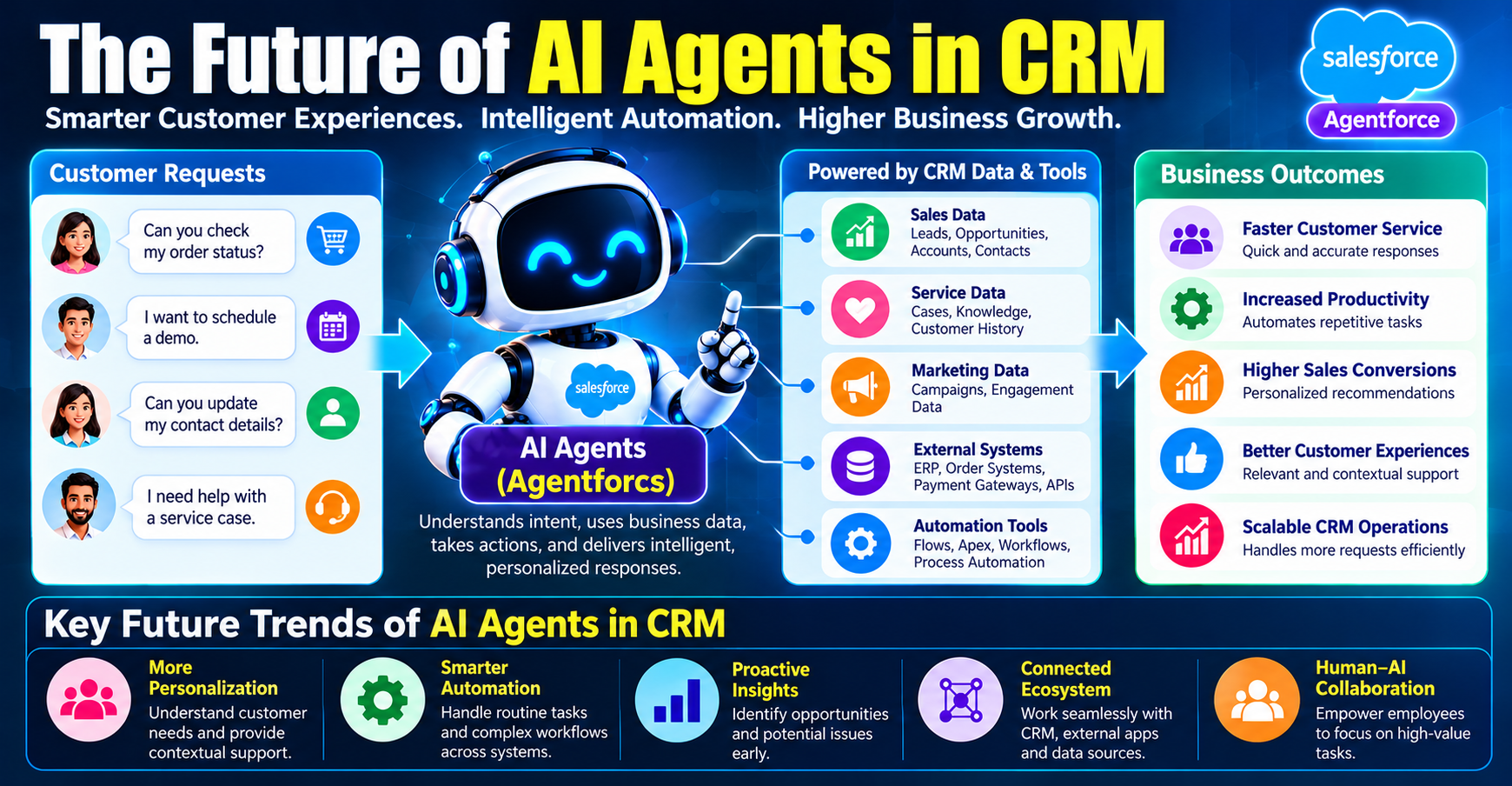
AI agents are becoming an important area of development in business software. As the technology evolves, organizations are exploring ways to connect conversational interfaces with business data, workflows, and approved operational actions.
Potential developments include improved coordination across tasks, better use of contextual information, more sophisticated evaluation, and broader integration with business systems. The availability and behavior of particular capabilities will depend on the products, releases, and configurations organizations use.
The future of AI in CRM will not depend on model capability alone. Reliable data, effective workflow design, security, governance, and user trust will remain essential.
Organizations that approach AI adoption thoughtfully can identify where agents provide meaningful value while preserving human judgment for situations that require it.
Frequently Asked Questions About Salesforce Agentforce
What is Salesforce Agentforce?
Agentforce is Salesforce’s platform for building and deploying AI agents that can assist with business tasks using configured instructions, available data, and supported actions.
How is an AI agent different from a chatbot?
A traditional chatbot may primarily follow predefined conversation paths or provide scripted answers. An AI agent can interpret requests and coordinate configured capabilities to help complete tasks. However, actual capabilities depend on the implementation.
Can Agentforce update Salesforce records?
An agent may be able to create or update records when the appropriate actions are configured and the required permissions and conditions are satisfied. Not every agent automatically has this capability.
Does Agentforce use Salesforce data?
Agentforce implementations can use Salesforce records and other approved information sources when the relevant access and configuration are available. Data access should follow appropriate security and privacy controls.
What is RAG in AI?
Retrieval-Augmented Generation combines information retrieval with AI-generated responses. It allows a system to use relevant information from selected sources as context when producing an answer.
What are AI agent guardrails?
Guardrails are instructions, technical controls, validation rules, permissions, and escalation processes that help keep an agent within defined operational boundaries.
Can Agentforce work with Salesforce Flow and Apex?
Agentforce implementations can use supported actions that invoke Flow, Apex, or other capabilities where appropriately configured. The correct approach depends on the requirements and supported integration patterns.
Is coding required to learn Agentforce?
Not every Agentforce task requires coding. Some responsibilities focus on configuration and business processes, while more advanced implementations may involve Apex, APIs, or other development skills.
Can AI agents make mistakes?
Yes. AI agents can misunderstand requests, retrieve incomplete information, or fail when an action or connected system encounters an error. Testing, validation, monitoring, and human escalation help manage these risks.
How can I start learning Salesforce Agentforce?
Start with Salesforce fundamentals, learn how CRM data and permissions work, and then explore agent configuration, actions, grounding, testing, and guardrails. Use current Salesforce learning resources and practical exercises to develop your skills.
Conclusion: Building Smarter CRM Experiences with Salesforce Agentforce
Salesforce Agentforce represents an important step in the evolution of CRM, bringing AI-driven interaction closer to everyday business processes. By combining language understanding with configured data access and actions, AI agents can help organizations answer questions, retrieve information, assist employees, and automate selected workflows.
However, building a useful agent requires more than choosing an AI model. Organizations must define clear objectives, prepare reliable data, configure appropriate capabilities, enforce permissions, test realistic scenarios, and establish a plan for ongoing monitoring.
For Salesforce Administrators, Developers, Consultants, and aspiring AI professionals, understanding these fundamentals can provide a strong starting point for exploring AI-powered CRM solutions.
The most effective approach is to begin with a focused business problem, design a solution with clear boundaries, and improve it through practical testing and feedback. When AI agents are implemented responsibly, they can support human teams, improve access to information, and help create more efficient customer experiences.
Explore Salesforce and AI training opportunities at CRS Info Solutions to strengthen your understanding of CRM, automation, development, integration, and emerging AI technologies. Combine structured learning with hands-on practice to build the skills needed to understand and work with modern Salesforce solutions.

