
What Is Salesforce Integration?
Introduction to Salesforce Integration
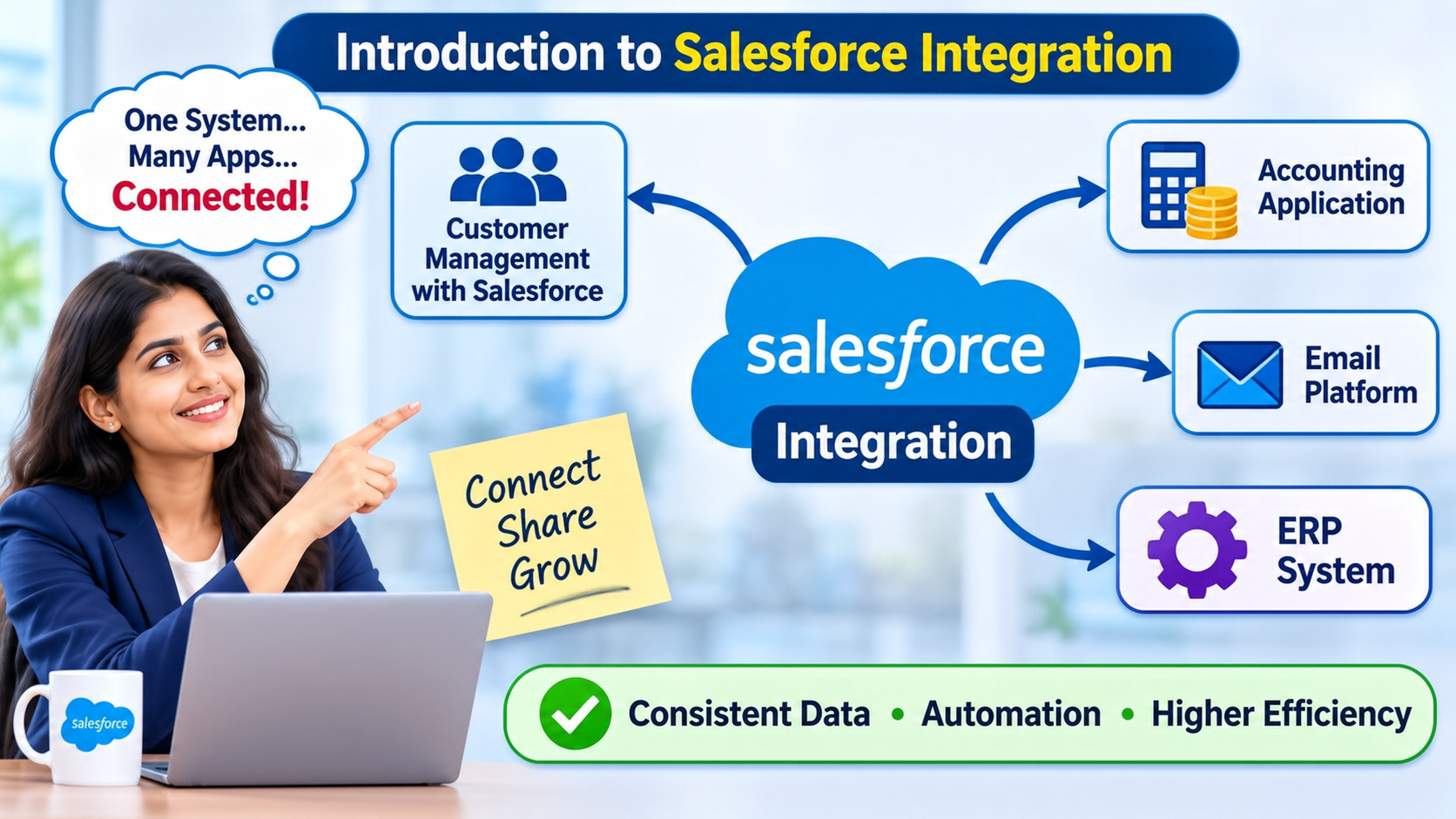
In today’s business world, organizations use different software applications to manage their daily activities. For example, a company may use Salesforce to manage customer information, an accounting application to manage payments and invoices, an email platform to communicate with customers, and an ERP system to manage business operations. But what happens when these applications need to exchange information with each other? Imagine a sales representative updating a customer’s information in Salesforce, but the finance team uses a separate accounting application. If both systems do not communicate with each other, employees may need to enter the same information multiple times. This can consume time, create duplicate records, and increase the possibility of errors. Salesforce Integration solves this problem by connecting Salesforce with external applications and allowing them to exchange data. It helps organizations maintain consistent information across different systems, automate business processes, and improve overall operational efficiency.
What Is Salesforce Integration?
Salesforce Integration is the process of connecting Salesforce with other applications, databases, services, or external systems so that they can communicate and exchange information. Salesforce is a powerful Customer Relationship Management (CRM) platform, but organizations often use multiple applications to manage different business functions. Integration allows these applications to work together instead of operating independently. For example, when a customer places an order through an e-commerce website, the order information can be transferred to Salesforce automatically. Salesforce can then create or update the customer record and make the order details available to the sales team. Similarly, payment information from an external accounting system can be synchronized with Salesforce so that employees can view relevant financial information without manually switching between multiple applications. In simple words, Salesforce Integration connects different systems and allows them to share information smoothly.
Why Do We Need Salesforce Integration?
Organizations need Salesforce Integration because business information is often distributed across multiple applications. Without integration, employees may need to access different systems separately, download information, and manually enter the same data into multiple applications. This process can lead to duplicate records, outdated information, and unnecessary delays. Consider a company that receives customer inquiries through a website. The marketing team collects customer details through an online form, while the sales team manages leads in Salesforce. If the website is not connected to Salesforce, employees may need to manually transfer every inquiry into the CRM platform. With Salesforce Integration, website form submissions can automatically create Lead records in Salesforce. The sales team can then follow up with customers more quickly. Integration also helps organizations improve data accuracy, reduce manual work, automate business processes, and provide a better customer experience.
Looking for the best Salesforce training in Hyderabad? Join our industry-oriented Salesforce training program to learn Salesforce Admin, Developer concepts, real-time projects, and practical skills. Get expert guidance, hands-on experience, and career support to prepare for Salesforce job opportunities.
How Does Salesforce Integration Work?
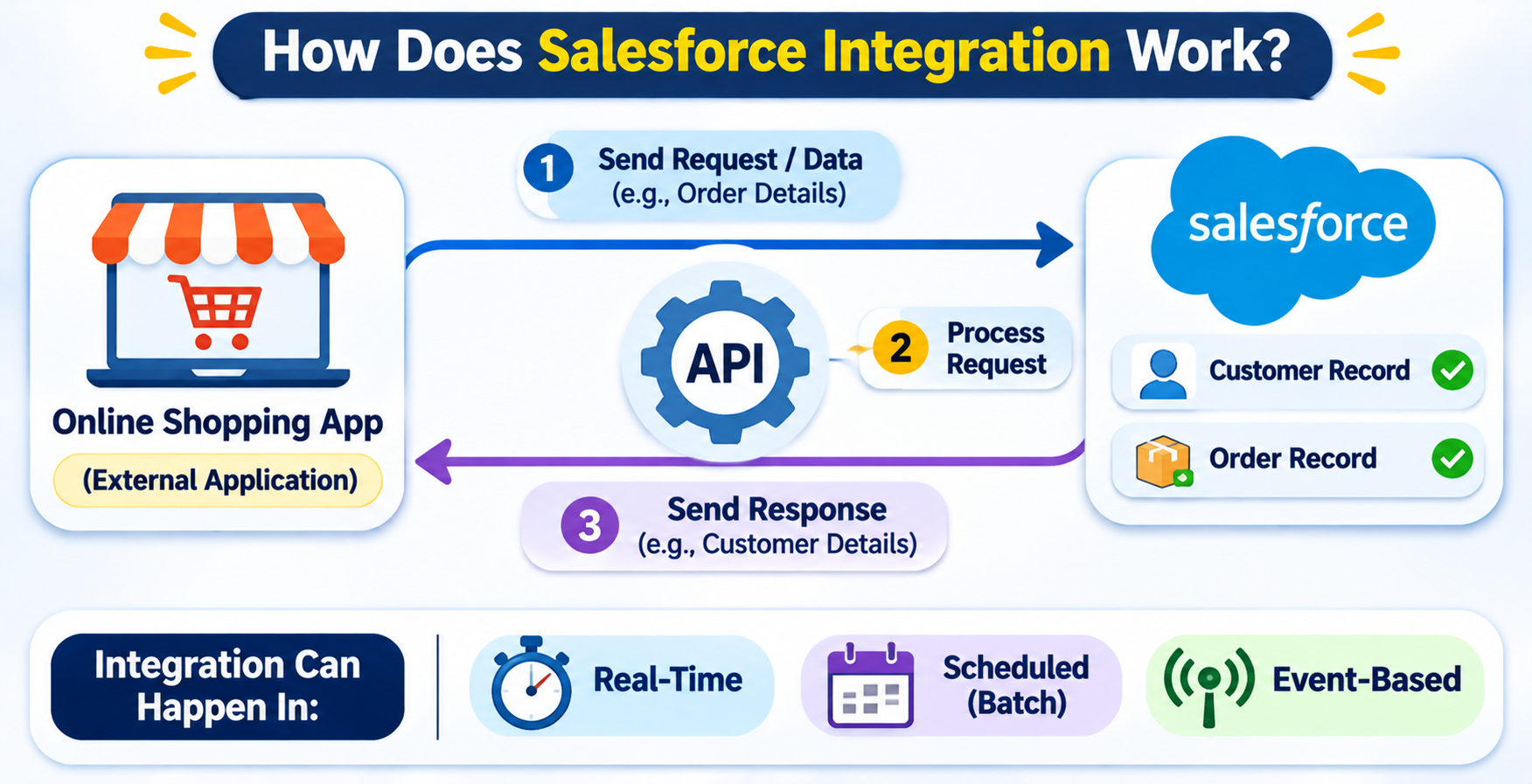
Salesforce Integration generally works by establishing communication between Salesforce and an external application. When one system needs information from another system, it sends a request or shares data through an integration mechanism. The receiving system processes the request and returns the required information or performs the requested operation. For example, imagine that an online shopping application needs to retrieve customer details from Salesforce. The shopping application can send a request to Salesforce through an API. Salesforce processes the request, retrieves the relevant customer information, and sends the response back to the external application. Similarly, when a customer places an order, the external application can send order details to Salesforce, where the information can be stored in the appropriate records. Depending on the business requirement, integration can happen in real time, at scheduled intervals, or through event-based communication. The integration architecture determines how data is exchanged, how systems communicate, and how errors are handled.
Understanding Salesforce Integration with a Real-Life Example
Let’s understand Salesforce Integration with a simple example. Imagine that a company sells laptops through its website. A customer visits the website, selects a laptop, enters their contact details, and completes the purchase. The website stores the order information in its own application, while the company uses Salesforce to manage customer relationships. Without integration, the sales team may not immediately know that the customer has purchased a laptop. Employees may need to manually transfer customer and order information from the website into Salesforce. Now imagine that the website is integrated with Salesforce. When the customer completes the purchase, the website automatically sends the relevant customer and order information to Salesforce. Salesforce can create or update the customer record and store the order details in the appropriate object. The sales team can then access the latest information directly from Salesforce. This is a simple example of how integration helps different applications work together and share information automatically.
What Is an API in Salesforce Integration?
An API, or Application Programming Interface, is one of the most important concepts in Salesforce Integration. An API allows two different software applications to communicate with each other by defining how requests and responses should be exchanged. Think of an API as a waiter in a restaurant. A customer gives an order to the waiter, the waiter communicates it to the kitchen, and the kitchen prepares the food and sends it back through the waiter. In a similar way, an external application sends a request through an API, Salesforce processes that request, and the required response is returned to the external application. Salesforce provides different APIs for various integration requirements. For example, the REST API is commonly used for lightweight communication through HTTP requests, while the SOAP API supports structured message-based communication. The Bulk API is designed for handling large volumes of data, and the Streaming API supports event-driven communication. The appropriate API depends on the type of data, integration requirements, and the architecture of the external application.
What Is REST API in Salesforce?
REST API is a widely used Salesforce API that allows external applications to communicate with Salesforce using REST architectural principles and HTTP methods. It commonly uses methods such as GET, POST, PATCH, and DELETE to retrieve, create, update, and delete records. For example, imagine that an external employee management application needs to retrieve employee information stored in Salesforce. The application can send an HTTP GET request to the Salesforce REST API to retrieve the required records. If it needs to create a new record, it can send a POST request. Similarly, PATCH can be used to update an existing record, and DELETE can be used to remove a record when the operation is permitted. REST API commonly exchanges data in JSON format, making it convenient for web applications and modern integration solutions. It is especially useful when applications need to communicate over HTTP in a lightweight and flexible manner.
What Is SOAP API in Salesforce?
SOAP API is another integration option provided by Salesforce. SOAP stands for Simple Object Access Protocol. It uses XML-based messages to exchange information between applications and follows a structured communication approach. Unlike REST API, which commonly uses HTTP methods and resource-based URLs, SOAP API communicates through defined operations and XML request and response messages. For example, an enterprise application may use SOAP API to connect with Salesforce and perform operations such as creating customer records, updating account information, or retrieving business data. SOAP API is useful in environments where applications require a formal service contract, structured messages, and established enterprise integration standards. Both REST API and SOAP API can be used to integrate external applications with Salesforce, but the selection depends on the requirements of the integration.
Types of Salesforce Integration
Salesforce Integration can be implemented in different ways depending on how applications need to communicate and exchange information. One common approach is real-time integration, where information is exchanged immediately when a particular action occurs. For example, when a customer updates their contact details in an external application, the updated information can be sent to Salesforce immediately. Another approach is batch integration, where data is collected and transferred in groups at scheduled intervals. For example, a company may transfer thousands of customer records from an external database to Salesforce every night. Event-driven integration is another approach in which one application publishes an event when something important happens, and another application responds to that event. For example, when an order is successfully placed, an event can notify Salesforce so that the corresponding business process can begin. Organizations choose an integration approach based on data volume, response time, business requirements, and system architecture.
What Is Middleware in Salesforce Integration?
Middleware is software that acts as a communication layer between different applications. In large organizations, Salesforce may need to connect with several external systems, such as ERP platforms, payment gateways, databases, and e-commerce applications. Managing all these direct connections individually can become complex. Middleware helps simplify this process by providing a central platform to manage communication, data transformation, routing, and error handling between applications. For example, imagine that Salesforce needs to exchange information with an ERP system and an external payment application. Instead of building and maintaining separate complex integration logic for every connection, an organization may use middleware to manage the data exchange. Middleware platforms such as MuleSoft are commonly used for enterprise integration scenarios. They help connect different systems and support scalable integration architectures.
What Is MuleSoft and How Is It Related to Salesforce?
MuleSoft is an integration platform that helps organizations connect applications, data, and systems across different environments. It is particularly relevant to Salesforce because businesses often need to connect their CRM platform with external enterprise applications. MuleSoft provides tools and capabilities for designing, managing, and monitoring APIs and integrations. For example, a company may use Salesforce to manage customers, SAP to manage enterprise resources, and another application to process payments. MuleSoft can help establish communication between these systems and coordinate the exchange of information. Instead of building every integration from scratch, organizations can use reusable APIs and integration components to simplify connectivity. MuleSoft is especially useful in complex enterprise environments where multiple systems need to communicate reliably.
Searching for professional Salesforce training in India? Learn Salesforce from experienced trainers through practical sessions, real-time projects, and industry-focused curriculum. Build your Salesforce skills and take the next step toward a successful CRM career.
Salesforce Integration with External Applications
Salesforce can be integrated with many different types of external applications to support business operations. For example, integrating Salesforce with an email marketing platform can help organizations manage customer communication and marketing activities. Connecting Salesforce with an accounting application can make relevant invoice and payment information available to business teams. Integration with an e-commerce platform can help synchronize customer details, orders, and purchase information. Similarly, connecting Salesforce with an ERP system can help different departments access business information across sales, inventory, finance, and operations. These integrations reduce the need for manual data entry and allow employees to work with more consistent information. The exact integration design depends on the external application’s capabilities, available APIs, security requirements, and business processes.
Challenges in Salesforce Integration
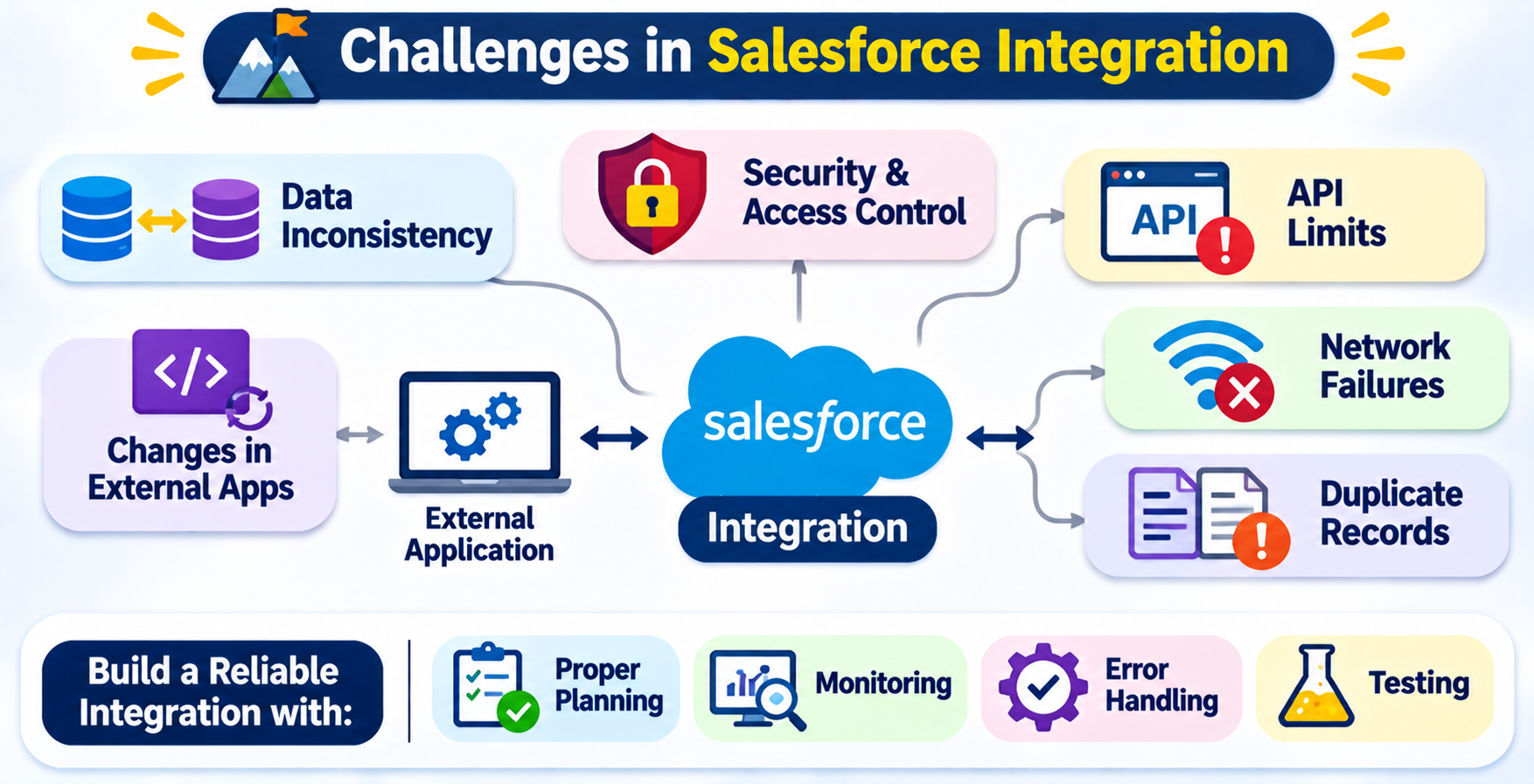
Although Salesforce Integration provides many benefits, organizations may face challenges while implementing and maintaining integrations. One common challenge is data inconsistency, which can occur when different systems store information in different formats or use different field structures. For example, one application may store a customer’s full name in a single field, while another application stores first name and last name separately. Data transformation may be required before transferring the information. Security is another important consideration because integrations often involve exchanging sensitive customer and business information. Organizations must use appropriate authentication, authorization, and access controls to protect their data. API limits, network failures, duplicate records, and unexpected changes in external applications can also affect integration processes. Proper planning, monitoring, error handling, and testing are essential for building reliable integrations.
Security in Salesforce Integration
Security plays a critical role in Salesforce Integration because connected applications may exchange confidential customer information and business data. Salesforce supports authentication and authorization mechanisms that help control which applications and users can access its resources. OAuth 2.0 is commonly used to authorize external applications to access Salesforce data securely. Administrators and developers must also consider permissions, profiles, permission sets, connected app configurations, and appropriate access controls. For example, an external application that only needs to retrieve customer contact information should not automatically receive permission to delete customer records or access unrelated sensitive data. Organizations should follow the principle of least privilege, which means providing only the access required to perform a particular task. Secure communication, credential management, and regular monitoring are also important parts of a reliable integration strategy.
Benefits of Salesforce Integration
Salesforce Integration helps organizations create a connected business environment where different applications can exchange information and support common business processes. It reduces manual data entry, improves information consistency, and helps employees access relevant data from connected systems. For example, when customer information is synchronized between Salesforce and an external application, employees do not need to repeatedly enter the same details in multiple places. Integration also supports process automation because actions in one system can trigger related activities in another system. This can improve response times, reduce operational delays, and help teams make better decisions using more complete information. By connecting Salesforce with the applications that an organization already uses, businesses can extend the capabilities of their CRM platform and create more efficient workflows.
Conclusion
Salesforce Integration is an important concept in the Salesforce ecosystem because it allows Salesforce to communicate with external applications, databases, and enterprise systems. Organizations use integration to exchange customer information, synchronize business data, automate processes, and improve operational efficiency. Technologies such as REST API, SOAP API, event-driven communication, and middleware platforms such as MuleSoft help developers build different types of integration solutions. Understanding how APIs work, how data moves between systems, and how security is maintained is essential for anyone learning Salesforce development and integration. In simple words, Salesforce Integration connects different applications and allows them to work together as part of a connected business environment. As organizations continue to use multiple cloud and enterprise applications, Salesforce Integration remains an important skill for Salesforce Administrators, Developers, and Integration Specialists.
Want to start your Salesforce career with Salesforce training in Bangalore? Learn Salesforce Admin and Developer concepts with hands-on practice, real-time scenarios, and expert trainer support. Develop practical skills and prepare for exciting career opportunities.

